OCRA Board Meeting Minutes – April 7th, 2020

Meeting Held by Video Conference

Present:

  • Dave W4SAR
  • Karen KD4YJZ
  • Bill N8BR
  • Nick KA1HPM
  • Dee KU4GC
  • Dan KR4UB
  • Wilson W4BOH

Agenda for Monday April 13th Over-the-Air Club Meeting

  • Monday’s Meeting will take place on the repeater—it will provide membership an opportunity to communicate in a round table discussion. To make it work will require a well-controlled management. Dave will direct the meeting.
  • Dan will review membership. There are now 72 members in the club. 20 are new. A high number need to pay dues, but these folks will not be identified to the club in an open meeting. However, our website will have a corrected current list of paid up members.
  • Nick will comment on the activities of Chatham Auxcom. That organization is on standby with a 48 hour notification of activities. They are not holding meetings at the EOC due to Covid-19 social gathering restrictions.

Following Dan’s enquiry Dee announced that DurHamFest for this year has been cancelled. Durham schools are closed for the rest of the current school year.

Dave announced that VEC duties with exams are on hold for now. This is a good thing since the exam team is in general composed of older folks who are most severely affected by the virus. ARRL is talking about the use of remote testing but in the mean time we will follow local regulations that currently govern meeting location and size of meetings.

A discussion of the current status of field day ensued. As of now the regulations are the same as they were last year, and will remain so until the ARRL makes a final decision. Dave believes the event will likely be cancelled. Discussion ensued concerning the potential problems involved with activities such as decontamination of mikes, keys and operating positions for participating stations as well as maintenance of social distancing issues. Dan will solicit comments on field day from the club.

Dan suggested that he has thoroughly enjoyed the few events that the club has presented by video conferencing, and suggested that we consider using more of this technology to both promote our club to potential new members as well as to better serve existing ones. His comments catalyzed considerable enthusiasm among the group. Specific suggestions that arose from the discussion included using this technology to:

  1. Recruit new club members
  2. Broaden participation at meetings by members living too far away to permit regular attendance
  3. Engage speakers from other clubs and relevant organizations to give presentations at our meetings without asking them to travel long distances.
  4. To present our club members with opportunities to more effectively collaborate with their counterparts in contesting, dxing, operating, public service and other important areas of our hobby.

The foregoing discussions culminated in the unanimous decision by this committee to present the membership with a motion to:

“Empower Dan, KR4UB, our website administrator,

  1. to research the basic strategies our club should use in order to most  effectively interface its mission with current best practice technologies for video conferencing.
  2. supervise the allocation of club funds to acquire the equipment, supplies, and subscriptions needed for the club to be able to utilize these technologies”.

Bill, N8BR – Club Secretary

OCRA Monthly Meeting – Monday April 13th @ 7:30pm via the 442.150 Repeater. NO Meeting @ Efland Baha’i Center

As the Efland Baha’i Center remains closed due to the State and County directives that will not permit gatherings, we will hold our monthly OCRA meeting over the air on the W4UNC repeater (442.150+, 131.8 PL). This will be via a directed net, similar in format to the AUXCOMM/ARES nets held on Saturday mornings, I as club president who usually runs the meetings, will act as net control, with someone else as a back up. We will commence this net at 7:30 pm on Monday, April 13.

When checking in, give your call sign and name only, I ask that we dispense with the “what I’ve done with ham radio lately comments” we usually do with introductions, we’ll have rag chew opportunities later in the net.

After all attendees are checked in, we will have brief officer’s reports. We will have brief pauses for any members to make queries or give brief comments, via the net control.

Our agenda at this time is:

AUXCOMM/ARES

Volunteer Exams

Field Day

Any other items?

There will be a pause after each agenda item, again for any member queries or comments, going through the net control.

Following the completion of the agenda, we will have a roll call checkout, as we do with the Saturday nets, where members who wish to continue a rag chew are welcome to do so.

Hope to talk to many of you there, stay safe all!

73,

Dave Snyder, W4SAR

Quaradoodles from the Land of Magic

Wilson, W4BOH

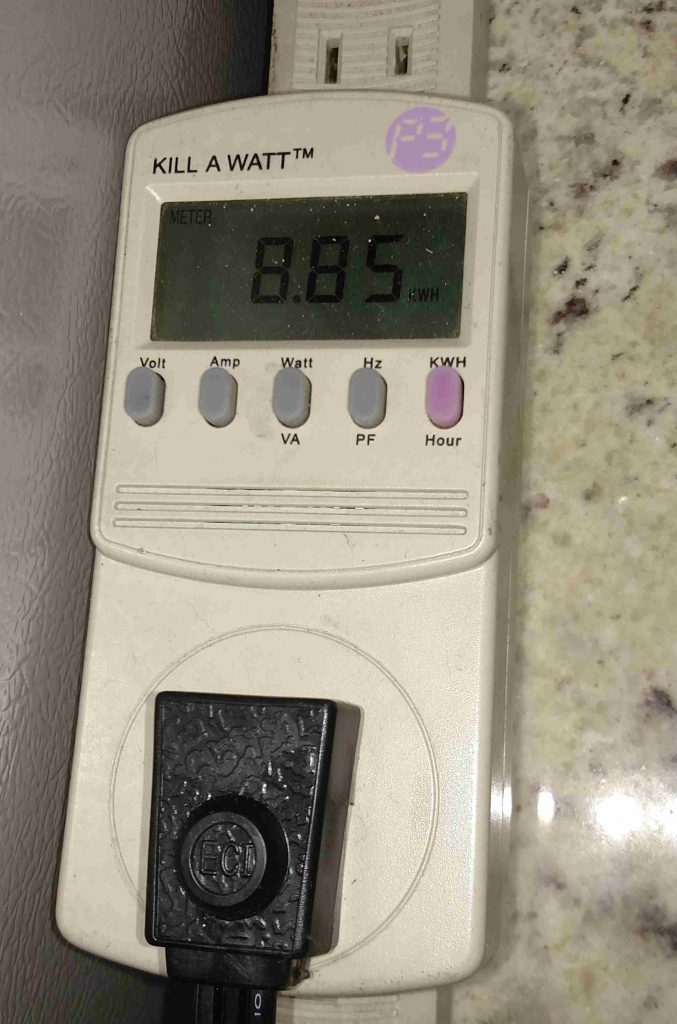
I’m really no less busy, but have used quarantine as an excuse to do a few fun things. Do you have a Kill-A-Watt, the great little $25 power meter. I do, but it’s been used almost entirely for measuring current drawn for various devices. But wait, there’s more! It does the obvious frequency, voltage, current measurements, but also POWER FACTOR (cosine of the phase angle between voltage and current). AND CUMULATIVE CONSUMPTION since last started.

[c] [y] photo by W4BOH, OCRA Inc

Here’s the tie to Covid: When I really think ahead, I can imagine power blackouts, short or long, leading to thoughts of generators to run things around the house. Of course there’s been lots of generator talk concerning Field Day too. So what’s my main concern about power? The weather is so nice that HVAC is not of interest. It’s too much load for to support for very long anyway. Next comes BEER! I like warm beer, but the same fridge also keeps our hamburger, bacon, etc., so it’s very important. Well, we just got a new fridge, a Frigidaire.  

BTW, are you old enough to remember when lots of people called any fridge a Frigidaire? That’s the reward for being early to a big market. I don’t remember not having a fridge, but I vividly remember neighbors who didn’t and, most interesting, the old man who drove an old wagon, pulled by an old horse, through our neighborhood. Houses using ice had a little sign they hung by their front doors to tell the iceman how much to leave. He would carry the ice in and put it in your icebox, if you wanted. He had bags of coal too. We kids would go along and chat with the old guy and eat ice chips from the bed of the wagon. I don’t think there was a sanitation grade on the wagon.

The previous fridge was a Whirlpool, a mechanical mess and a power hog. Maybe they are better now, but I wouldn’t bother with them. Getting back on track now…. Would it be practical to run the new fridge from a generator and/or batteries? YES, since it runs at an incredible low current of ONE AMP, 120Watts! Now, that’s way low power for any generator (although the inverter models idle down pretty well) and the efficiency of gasoliine use would be poor. So what to do?

There are lots of inverters available these days and even real sine wave models are reasonably priced. I don’t know, but a 500W model would likely handle the 3A or so starting current of the Frigidaire. SO what does the Kill-A-Watt tell us, besides the one Amp running current? I ran a 100 hour test period, four days, during recent temperate weather, with the kitchen running around 70 degrees F most of the time. Over the 100 hours we used 5KWh, so the average load is 50 Watts and the running time was 40 hours. That’s about 1.2KWh/day, costing about $55/year around here. And how does that relate to batteries? It’s almost exactly the rated capacity of the big AGM batteries we got from Adriano last year, 120Ahr at 12VDC.

But you don’t want to run your batteries all the way down, so we can think of two batteries we recharge once a day.. The problem then is to choose a reasonable charge rate and charger. A conservative charge rate of C/6 would be 20A per battery or 40A needed from the charger. That’s only about 500W, still low, but better. The Honda 2200W generator claims to use 0.17 gal/hr at 1100 W. That’s 21,250 BTU from gasoline to make 1.1KWh or 3750BTU of electricity. An efficiency of 18%, gas in to electricity out, NOT SO GOOD. Let’s call it 15% at lower load. Making electric heat from gasoline is NOT a good thing! Assuming we can get 15% at 500W (wildly optimistic), we need 11350 BTU of gasoline to make our 1700 BTU (0.5KWh) of electricity. That’s about 0.1 gallon! It’s also about a beer can full.

That seems too good to be true, to me, but it’s what the numbers say, if Honda isn’t lying. It’s 20 cents, if gas is $2/gal and you’re getting about 6 cents worth of power, if you got it from the grid. That shows that you can’t beat the power company, unless you get some PV panels! And don’t forget, you’ll have to run like that for 5 hours to get your batteries back up, costing you about a buck. What ho, that’s $365 for a year, versus the $55 running on the grid, but your beer is cool and your steak doesn’t spoil!

And we neglected the $1000 for the generator and the $200 for the inverter, but we won’t charge for them, because we need them for Field Day!

Or you could run off the 12V battery in your Prius, but that recharge would be much less efficient.

Now, I did this quickly, for fun, so feel free to point out my errors. There’s some rounding and some assumptions, so we’re looking for 25% accuracy, at best. If I’m in that range, I’m happy, but I still worry about the Honda claim.

73,

WL

DFMA Club Over-the-Air Meeting, Tuesday April 7th at 7pm

DFMA will not be having in-person meetings until further notice due to the Covid-19 pandemic.

Fortunately, our hobby supports communicating from a distance. Instead of our usual monthly meeting at Bullock’s, we’ll have a special net. The net will be at 7pm on April 7th, our usual meeting time, on the linked 145.45- and 147.225+ repeaters (both have a PL tone of 82.5). You can also check-in over the Internet via Echolink/SVXLink to the WR4AGC-R node. The format of the net will be check-ins (in place of our usual introductions), officer reports, and a rag chew round table discussion.

Jack, KM4MBG, 4/3/20

OCRA-DFMA Saturday Morning Breakfast, rather Video Conference

from Jack, KM4MBG & Chris, KK4VBE

Reminder tomorrow, April 4th, after the 9:30am Orange County Auxcomm net on the 442.150 repeater

There will be a Saturday morning video conference to help fill the void left by the cancelation of our celebrated ham breakfasts due to the Covid-19 pandemic. That net usually doesn’t last long, so we’ll try to start at 9:45am local time.

Directions for Joining:

Make sure you have a computer with good microphone and speakers (a headset often works well). There is no software to install. Use your web browser to go to URL address posted in the video conference announcement note on the OCRA-DFMA Joint Email list at the appointed time.

Thanks to Chris, KK4VBE, for hosting the server. Hope to see y’all online.

And more from Chris,

If you do not have a computer with a camera and or mic but have a smartphone you can still join in on the video call. You will need to install the Jitsi app form the app/play store.

IOS App Link https://itunes.apple.com/us/app/jitsi-meet/id1165103905
Google Play: https://play.google.com/store/apps/details?id=org.jitsi.meet

Then at the appointed time click the link in the recently posted note on the OCRA-DFMA Joint Email list and your web browser will open and give you the option to launch the app.

73, Chris KK4VBE

Earlier note from Jack, KM4MBG,

  • WHO: As some of you know, there are various HAM groups in the area that meet on Saturday mornings for breakfast.
  • WHAT: At least one of these groups organized a virtual meeting March 28th among themselves. We had also talked about doing a virtual meeting on the DMFA net.
  • WHEN: Originally, I had called for the club’s virtual breakfast meeting to be at the same time as one of these other gatherings, but decided to defer to next Saturday, April 4th.
  • WHY: Those of use who are not introverted [1] need some socialization time. In addition, those of us who are not working from home or are unhappy with the remote collaboration tools that our workplace is using, wanted an excuse to play with technology.
  • WHERE: This wasn’t asked, but it fits the theme. For the first meeting, we’ll be using the Jitsi Meet browser application. I’ll send out more details and a reminder next week.

Many thanks Jack & Chris!

Great Time to Update the Hamshack

From Keith, W1KES

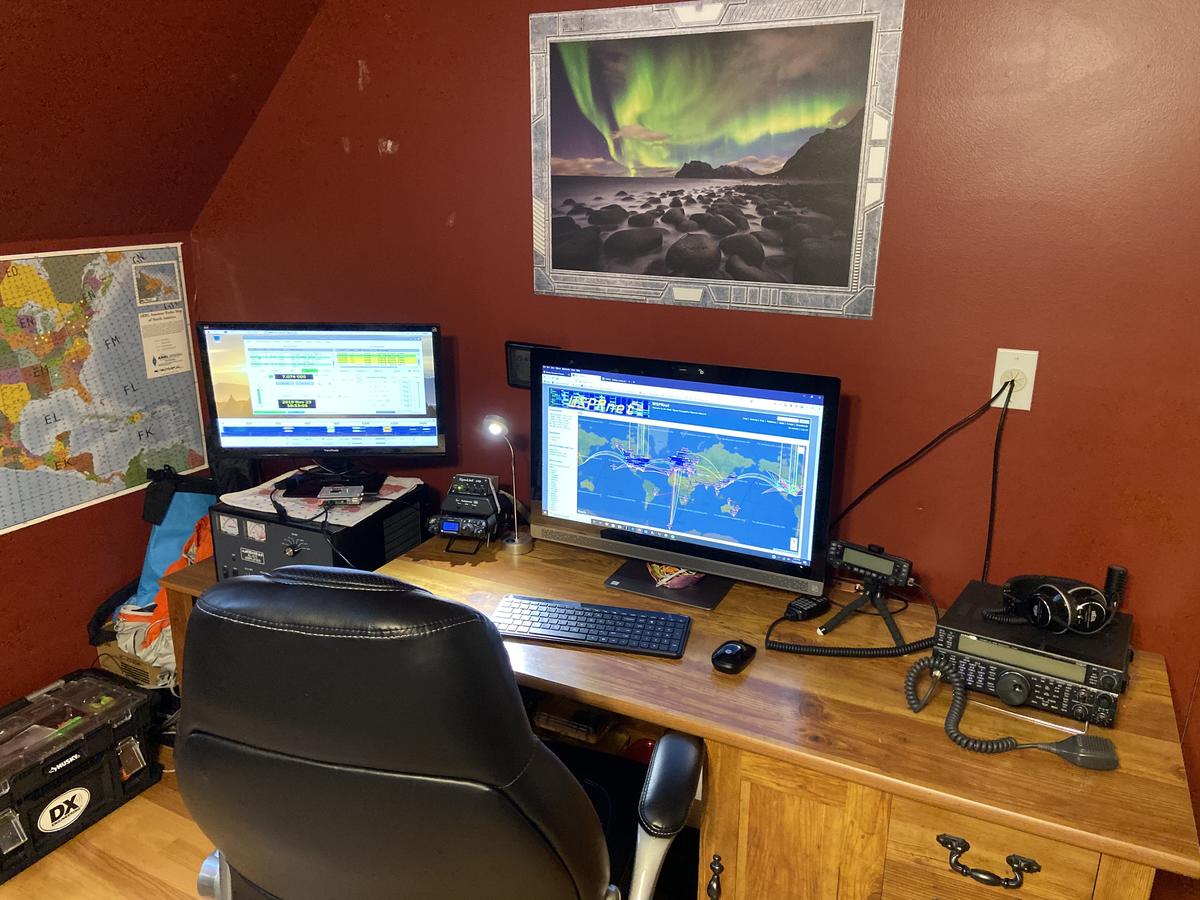
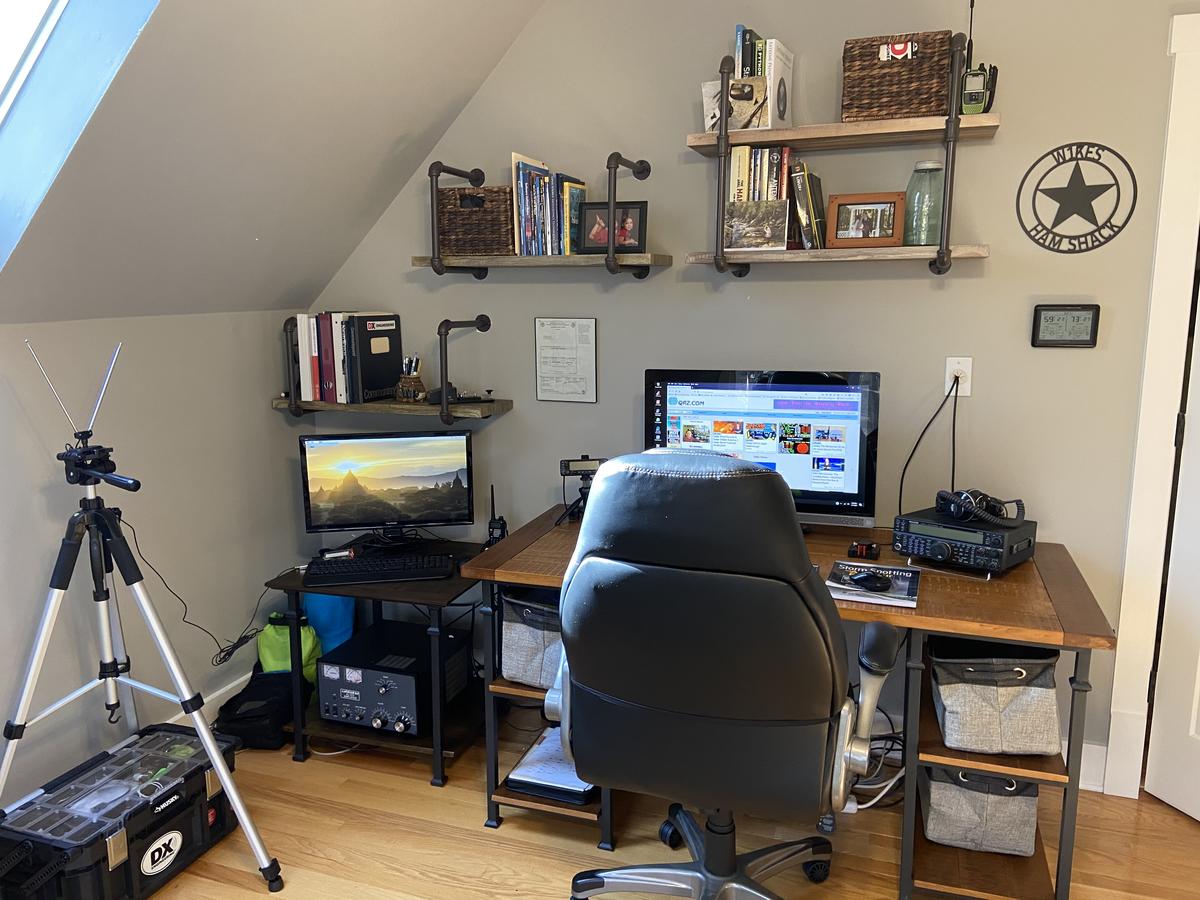
Last month, we repainted our bonus room, A.K.A. dad’s shack after 17 years. Additionally, we added new furniture and shelves. I have spent the last several weeks organizing and optimizing the space. My shack also serves as my home office, which has received more use this past week than the previous year. With kids out of school until mid-May, I plan to spend many hours working and “hamming” in my recently renovated space.

Before

After


From the Land of Magic – Solar Panel Load Controller

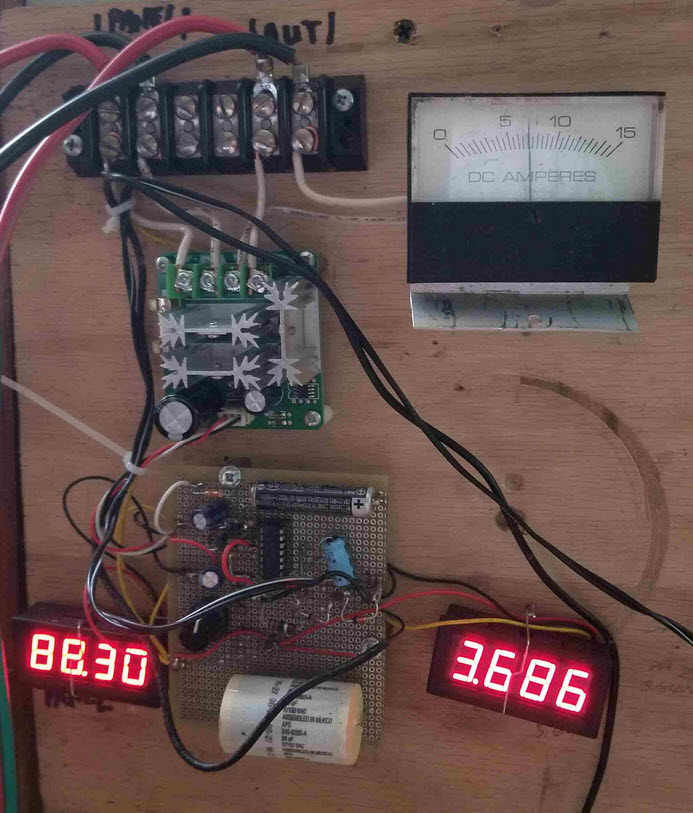
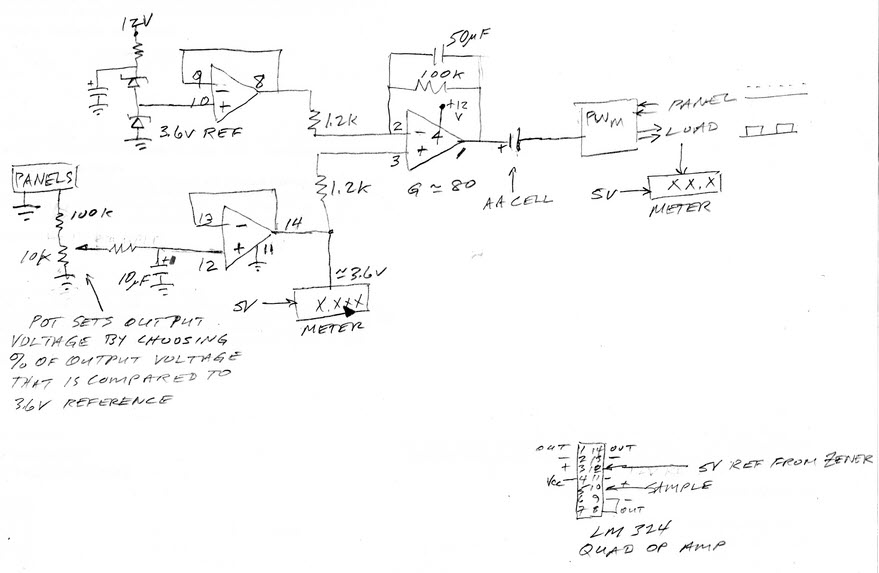
From the Land of Magic! a high tech solar panel load controller, built for son Pete. You can see that the latest components and construction methods are employed.

There’s a differential amp that drives an Ebay PWM speed controller ($11) to load the panels to their max power voltage, regardless of the insolaton* level. A sample of the panel voltage is compared to a Zener reference to generate the control signal to the PWM unit.The load is a 4500W water heater element in a tank in front of his regular water heater. There are three 235W panels with 29.4 V max power voltage.

I had a great talk with a dealer recently. It seems that PV power is now cheaper than heating water directly with wet panels. Cheaper panels and good inverters seem to have made a big difference.

Wilson, W4BOH

insolation* No that’s not a mispillin’  Insolation‘ is the solar radiation (power/Unit Area) that reaches the earth’s surface, which average high sun is close to 1KW/square meter.

Controller Schematic

A Better Mouse Trap or is that a CW Key?

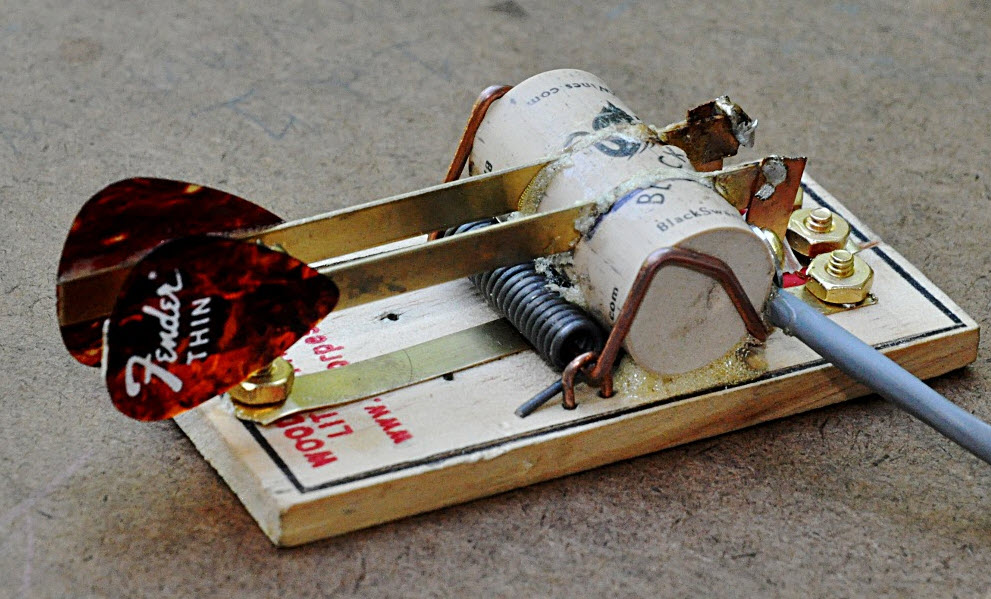
Well I’m quite familar snap! with the Victor mouse trap after a recent bout of mice invading the garage and building nice little nests in the heater air intakes of not just one but two cars.. little buggers!

But, Ken AC4RD’s use of said device plus a couple Fender guitar picks and a wine bottle cork brings a whole new meaning to home brew! Always thought those wine bottle corks had another great use.

Thanks, Ken!

[c] [y] photo by Ken AC4RD, OCRA Inc

Sheltering in Place due to the Coronavirus?

and want to stay in touch with your ham friends?

Show your friends your latest pride and joy project or any field of interest you would like to share with your ham friends.

How? Send an email to orange.county.radio.amateurs@gmail.com with attached photos, or a link to the photos you wish to share,  a brief description and I’ll post it on the OCRA website.

Face to face OCRA Club, Volunteer Exam Sessions & Board Meetings are cancelled until further notice due to the Coronavirus pandemic.

However, On-the-Air meetings and videoconferencing meetings will be used as an alternative. Stay “tuned” to OCRA-DFMA Joint Email List

Dan, KR4UB

What is it?

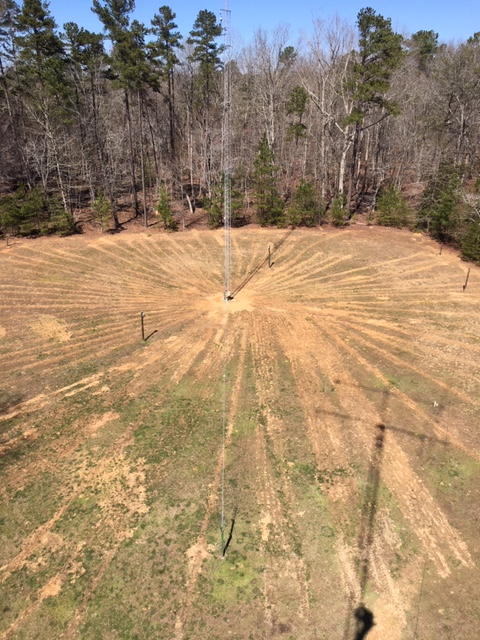
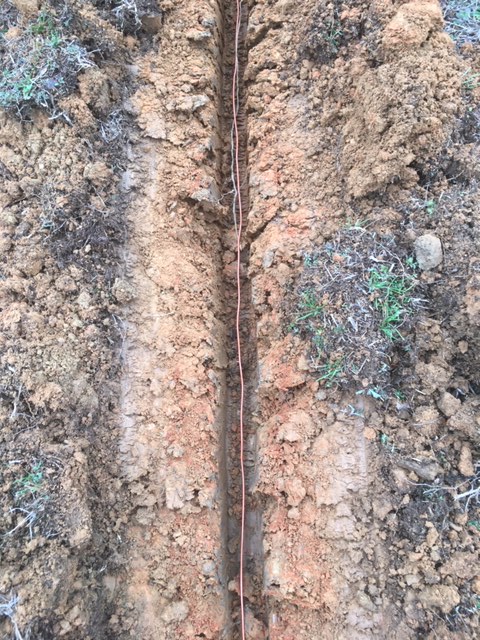
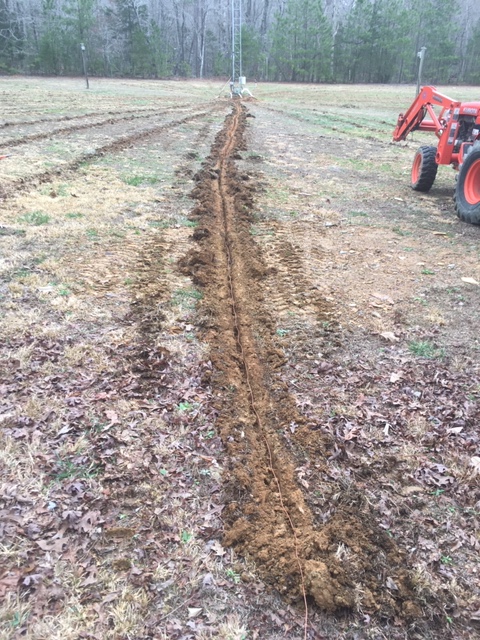
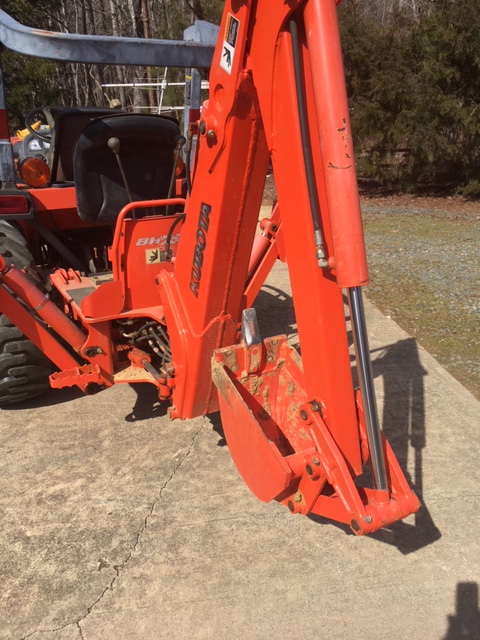
Well lets see… a large open field, complete with shadow of another tower with 2 large beams (and climber down below)  A top-hat loaded 100′ tower for the 160m band that the owner plows in sixty-six 90 foot long radials for maximum performance.

Who else? Of course its the new N1LN 160m band antenna setup.

Kubota tractor with an attitude..

Suggestions & Ideas for Improving the OCRA Website

Status

The layout of the OCRA website is being revised to better serve the current membership, those newly into amateur radio and potential new members wanting to find out more about the hobby.

Frequently referenced information about OCRA, membership status, repeaters, frequencies, net scripts, club activities have been moved to the sidebar on the left.

This change frees up the main portion of the home page space so that it can be better used for information and annoucements regarding training and other upcoming activies.

Your comments and suggestions for improving the OCRA website are requested!

thanks in advance! Dan, Web Site Administrator

Polycomm (Obi) 202 as a shack telephone service solution

By Charles McComas KN4PTU

I like having a wired desk phone in my home office/radio shack for use during conference calls and long waits for tech support. The clarity and functionality of a landline desk phone is much better than the average cellular connection. Until the last few months this was handled quite well by a VPN connection to my employer’s Cisco VOIP system. After I retired, I started looking for a new solution. In a perfect world, I would have gotten a POTS (Plain Old Telephone Service) line, as the reliability of the old analog copper wire system is unmatched by the newer VOIP (Voice over Internet Protocol) telephone services. Unfortunately new POTS lines are not available and all telephone service providers are rapidly changing existing lines to VOIP.

Checking with AT&T, my current ISP (Internet Service Provider), it would cost me a $100 setup fee and around twenty dollars a month for a phone line. I have had great experiences with the knowledgeable AT&T technicians in the past but a $100 service call to plug in a patch cable is a bit steep.

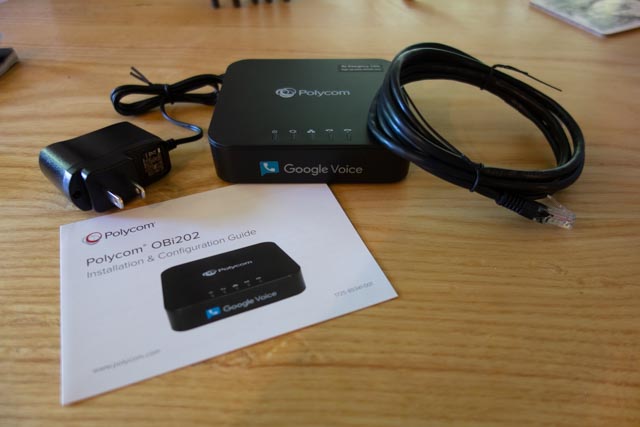
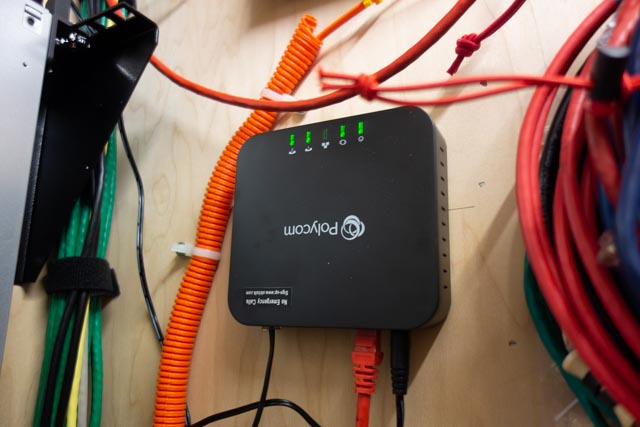
In my net surfing I came across Obi, who makes a range of ATA (Analog Telephone Adaptors) devices and phones. I ordered an Obi, now Polycom Obi202 ATA  (Photo 1) as it has a second phone line port that I plan to use for the fax function on my multi-function printer.

Picture of the Polycom Obi202

(Photo 1) Polycom Obi202

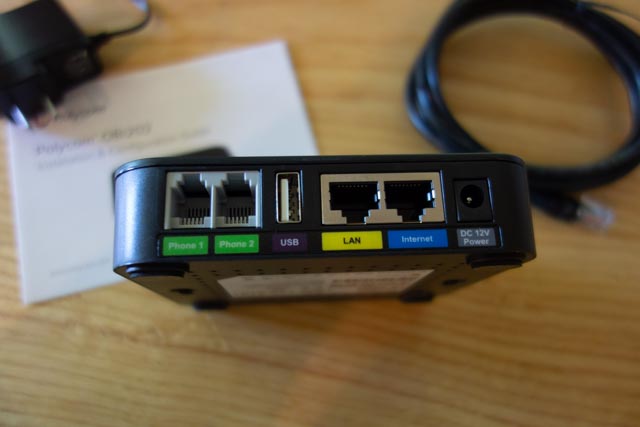
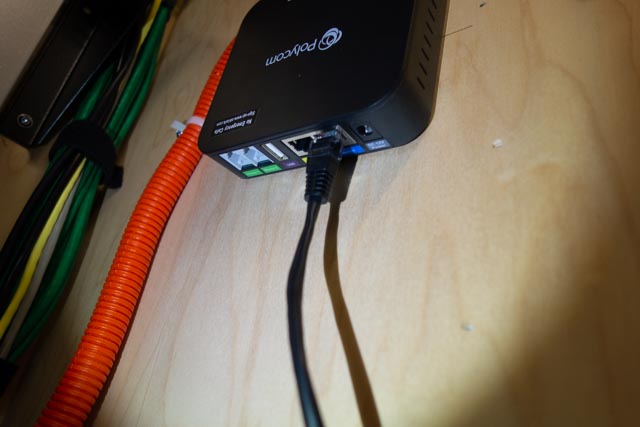
The back of the unit (Photo 2) has the two phone line (RJ11) connectors, a USB port for future functionality and two RJ45 connectors, one for Internet in and one for Internet out.

Back of the Obi202 showing the connections

(Photo 2) Back of the unit.

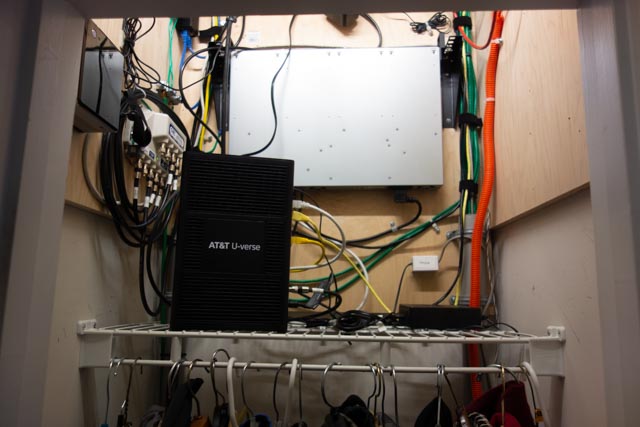
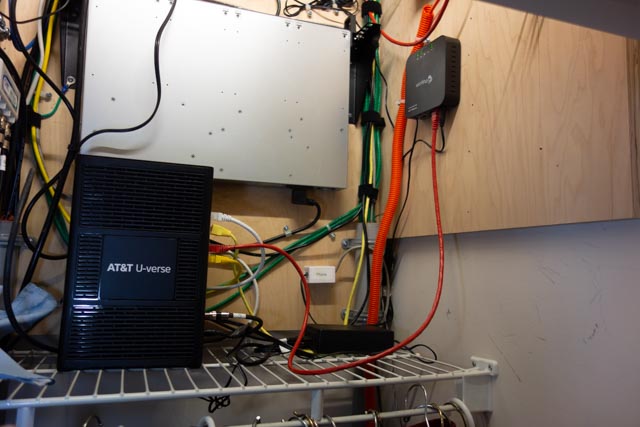
I will be installing the device in my hallway coat/telecom closet (Photo 3).

Photo of the interior of the hallway closet, showing the AT&T fiber modem, and cables and equipement mounted on the walls above the coat rod.

(Photo 3) Telecom closet.

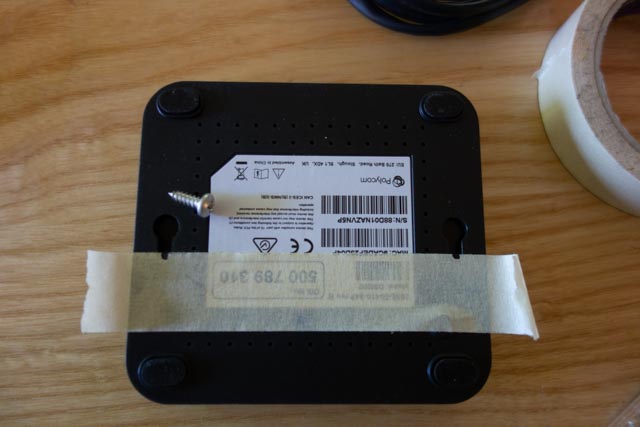
I used a piece of masking tape to make a template for the mounting slots (Photo 4).

A piece of masking tape on the back of the unit with marks on it to indicate were the mounting slots are located.

(Photo 4) Marking the mounting slots

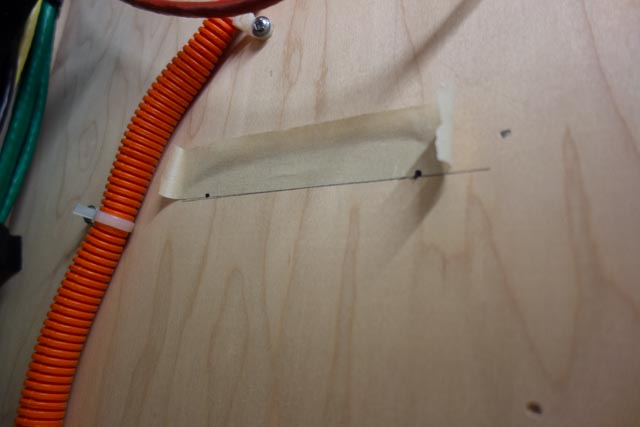
I drew a level line with a torpedo level and stuck the tape to the line (Photo 5).

Template tape stuck to backer board following the level pencil line.

(Photo 5) Tape template and level line

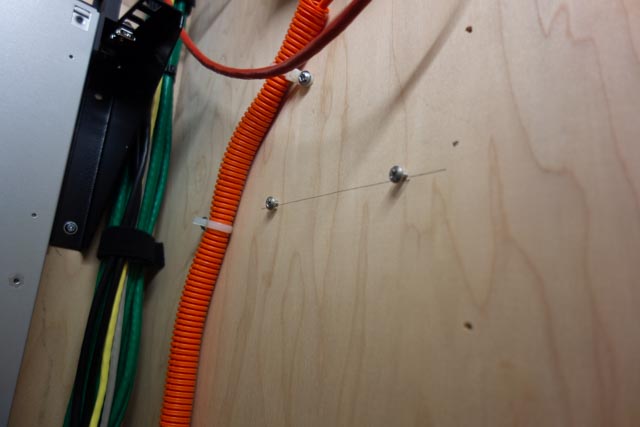
Drilled the holes for the mounting screws (Provide your own) and screwed them in (Photo 6).

Installed mounting screws on the backer board

(Photo 6) Installed mounting screws

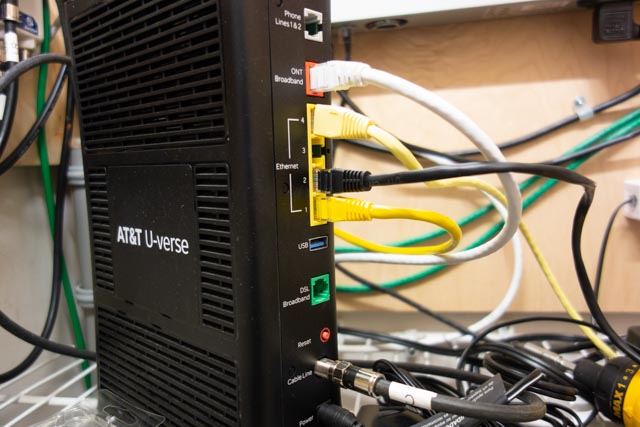
I connected the provided patch cable to an open Ethernet port on the AT&T modem (Photo 7).

Back of AT&T fiber modem, showing were the patch cable is attached

(Photo 7) Modem Ethernet ports.

and to the Internet in port on the device (Photo 8).

Ethernet patch cable connected to the Internet in port on the Obi 202

(Photo 8) Patch cable attached to the Obi 202

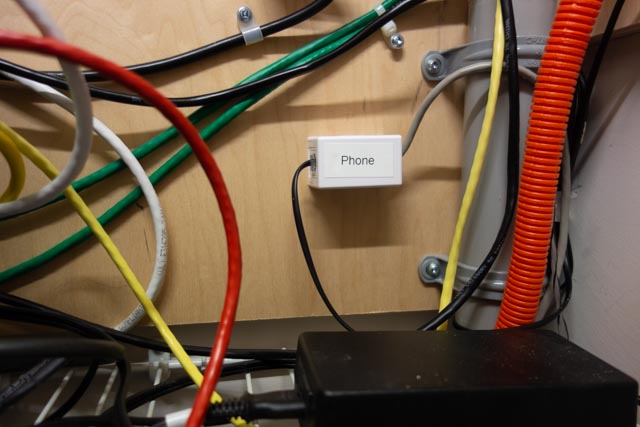
A four-wire phone cable with RJ11 connectors goes from the Phone 1 port on the unit to a surface mount block in the closet (Photo 9).

Single jack surface mount block with a RJ11 keystone connector with a phone line coming  from the Phone Line 1 port on the device.

(Photo 9) Telephone line cable connected to the surface mount block.

. The cable from the block is spliced into the house’s original telephone service cabling and provides a dial tone to every telephone outlet in the house.

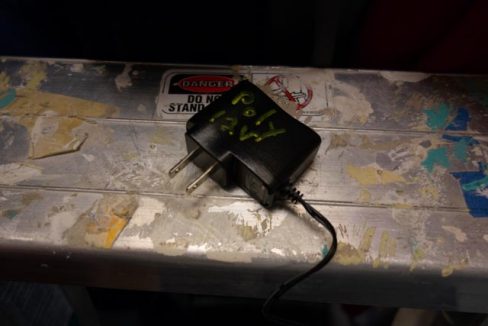
Before installing the power supply, I mark it with a paint marker to identify what equipment it is used for and the output voltage (Photo 10).

Unit power supply with the purpose and output voltage marked on it.

(Photo 10) Power supply

This comes in handy later to match up equipment with a power supply or to clean out a drawer that is overflowing with old power supplies.

The power supply is connected to an open outlet on the server rack PDU (Power Distribution Unit) and to the device. We have power and blinking lights (Photo 11).

Obi 202 connected and powered up

(Photo 10) Connected and powered up.

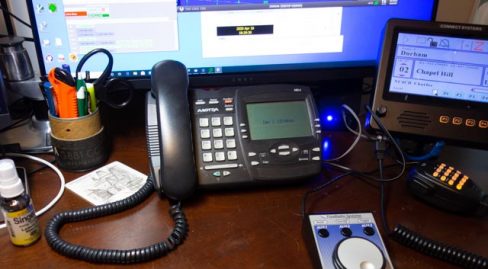
An Aastra 480e, analog desk phone, is connected to the phone jack in my office. I have a dial tone and I dial the special number provided in the instruction and do a echo test (Photo 11).

Phone sitting on desk

(Photo 11) Desk phone in place.

The next step is to set up a account on Obitalk.com. Once you have done that, you start the setup for a new device. On the phone connected to the ATA, you dial the number provided on the setup page and the Obitalk back end server identifies the device and you will see the device listed on your account web page

With a Obitalk account you can call and talk to other Obitalk accounts for free, but to call outside of the Obitalk network you need to have a account with a VOIP service provider. Obitalk supports most of the major home and small office VOIP providers as well as Google Voice. I have used Google Voice since before the technology was bought by Google and have been satisfied with the service. Best of all it is free for calls in the U.S. and Canada. But if you think that Google already knows too much about your life, you can go with one of the other VOIP providers. Also a big Warning, 9-1-1 service does not work with Google Voice. However you can add 9-1-1 service from another provider to your setup in Obitalk and still use Google Voice. Another concern is what Google gives for free, can be taken away in an instant, so I would not use a free Google Voice account for a phone number that is tightly tied to your business or where you can’t take an outage for a day or two. If you pay for G suite, those worries are about nil as Voice is part of G suite

Since I used my Google account to set up my Obitalk account, it had already configuring the Polycom Obi 202 to work with Google Voice. I made a few selections on what phone line to use for inbound and outbound calls and that was it. Configuration took less than 10 minutes and the total time I spent on the installation was about a hour. Most of that time was bringing in and then putting up the tools I used to install the device in my closet. Voice quality is very good. Reliability is too soon to tell.

Inside of the closet with the completed installation on the right wall

(Photo 12) The finished installation

Bill, N8BR on the OCRA Monday Night 10M Net via Video Conference

Remember the HF phone patch that used to be commonplace in the ham shack years ago?  How about a video conference HF patch?  Or for that matter, flip a switch and it’s a video conference to VHF/UHF patch?

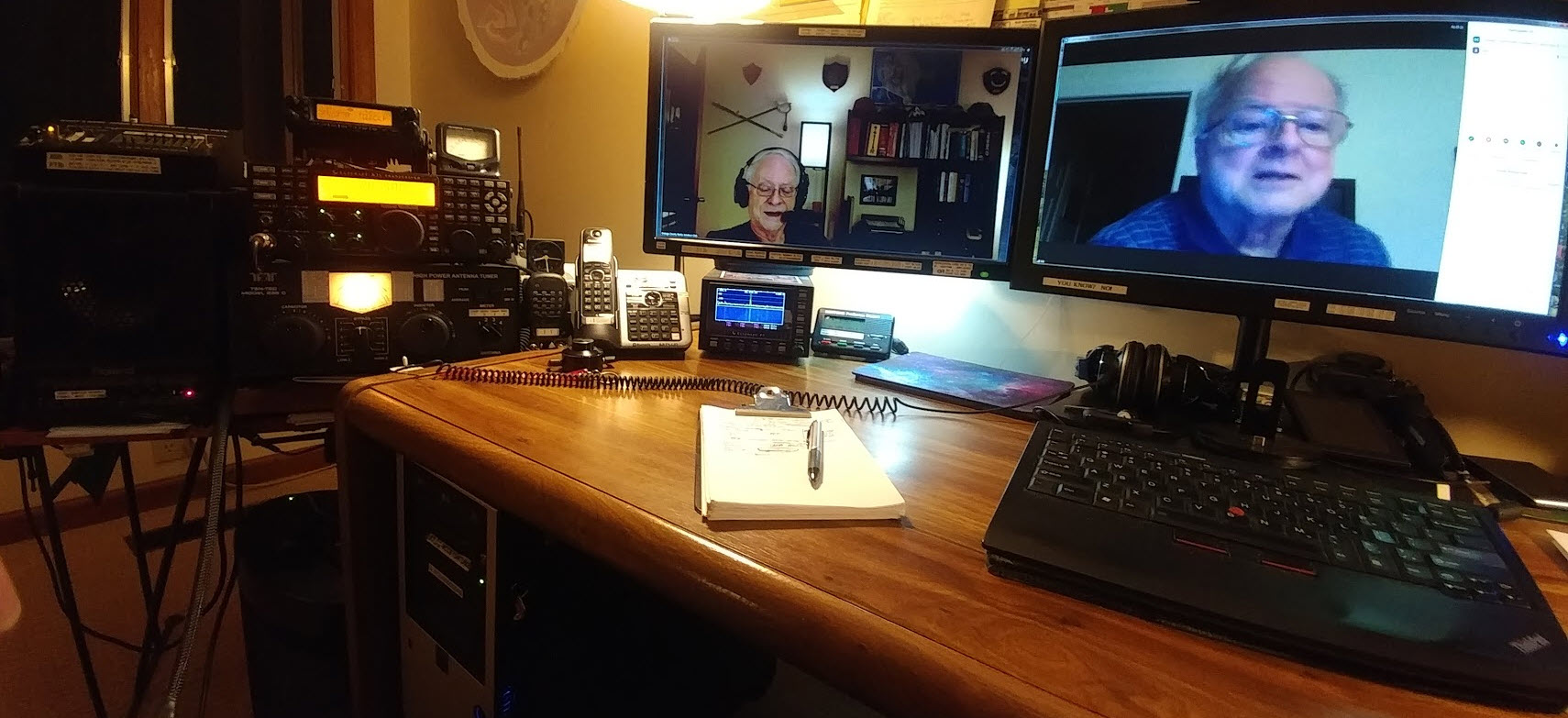
Bill, N8BR does not have an HF station at his QTH, but that did not stop him from listening to the net and Dan, KR4UB passing on his comments to the net.

Dan hosted a video conference and invited Bill to join the OCRA Monday Night 10M Net on 28.450 via video conference.  Ham station audio is fed into the computer running the video conference application. A simple switch of the video conference microphone device driver setting from the normally used Logitech HD camera microphone to the computer line-input brings the ham radio receiver audio and Dan’s Heil headset microphone audio into the video conference.

[c] [y] photo by KR4UB, OCRA Inc

Much of the equipment used and shown below has origin in other usage and has morphed into a small home audio studio serving multiple purposes. This application is a good example of the versatility it can provide.

The video conference “audio patch” application demonstrated here might could be built using some of the audio interfacing devices found in today’s ham shack for computer sound card driven amateur radio communication modes. However, if undertaken getting the audio chain correct might still require use of external audio mixers, attenuators, and additional isolation and perhaps impedance matching transformers, and instrumentation to get the sound right.

W2IHY Technologies Equalizer Function

The ham radio connections in this setup uses a W2IHY Technologies Equalizer that has multiple microphone inputs, one used for the Heil Headset microphone and a second input is used for the video conference inbound audio feed.  The internal microphone amplifier gain is adjustable to ensure appropriate drive level to the selected ham transmitter with the output fed via an internal isolation transformer for RFI protection. The output is switch selectable to one of  two ham station transmitters, in this case a Yaesu 8900 VHF/UHF and the Elecraft K3s transceiver. The phone jack output is an outbound (ham transmitter mic input) audio monitor output that is also connected to one of the Roland Monitors as described below. The equalizer interconnection ports available for all audio outbound to the ham radios are shown below.


Roland CM-30 Studio Monitor Function

Two Roland CM-30 Mini-Cube Studio Monitors in an interconnected stereo link configuration provides multiple audio channel mixer inputs as shown below on the one of the two units. One of the CM-30 units is used for all inbound (video conference incoming audio & ham radio receiver audio) feed mixing. Outbound (ham transmitter microphone inputs & video conference outbound) audio is separately mixed in, permitting audio from all sources to be monitored on the Heil headset as a final control operator quality check. Roland, a major manufacturer of musical instruments and sound stage equipment describes the CM-30 as a multi-purpose portable mixing monitor for the home-studio and portable live monitoring onstage applications.


A Jensen two channel isolation transformer previously used in a home theatre application is used to provide RF & ground loop isolation between the ham station and computer audio connections.  Braid ground strapping bonds all equipment to the common station ground.

A recently added connection for the video conference audio output will permit that feed to be mixed into the Elecraft HF or the Yaesu VHF/UHF mic input so video conference folks have half-duplex two way audio communications and can join the rag chew. None of this will be automatic and will require the control operator to set up the “audio patch” and operate the PTT control, the same as was required by the FCC back in the days of “phone patch” operations.

Inbound, Outbound, Mixing, Attenuators, etc, etc

Does the above discussion of all the inbound, outbound, audio mixing sound like one giant circular loop?  Not surprising… Ever wonder why speakerphones, telephone handsets, cellphones, bluetooth headsets, hearing aids and now video/audio conferencing…. any accoustic environment where speakers and microphones are in close audio proximity doesn’t turn into an enormous squealing audio feed back loop?  You’ve probably heard that many times with public address systems. What’s the magic?  What invention took place and has been deployed in telephone systems from the beginning?  The telephone hybrid transformer, used in bidirectional audio paths where two audio directions are combined in to a single audio channel. This function is essential in today’s world of communication devices and typically done with digitial signal audio processing. The mixing and combining of audio paths described in the above setup had to be done in a way to avoid generating an audio feedback loop at several possible points in the circuit.  The bidirectional processing or half-duplexing of conference audio by a video conference service is also a necessary ingredient.

The Nearby HT / Repeater Echo Effect

You’ve probably have experienced this effect in ham gatherings when you transmit on with your HT into a repeater and someone close to you has their HT volume turned up on the same repeater you are using.  You’ll hear your own voice coming through being delayed in time or an outright audio feed back squeal occurring. The delayed audio echo effect is caused by an audio delay line in the repeater controller for the purpose of removing squelch noise bursts at the beginning and end of every transmission into the repeater and also for masking DTMF repeater control tones sent to the repeater.  The OCRA 442.150mHz repeater is programmed to use a 70 msec audio delay to accomplish the above purposes. Sounds short, but very disorienting to hear your own voice delayed in time as you try to speak!

The conference to repeater audio bridge described in this article can have similar echos in the video conference side when repeater radio transmissions are recirculated from radios in the video conference. Video conferences can be more vulnerable as downloaded video conference applications typically provide a microphone audio AGC (automatic gain control) that if checked will adjust your computer/conference device microphone gain on the fly to make all voices at the same level in the conference. This is a good thing for the conference, but stray radio audio can be problematic.

However, the effect can be totally eliminated by proper audio protocols being practiced by those in the video conference. Those procedures will be described in a separate article.

While the equipment used here may border on overkill, hopefully the above audio discussion explains the necessity and there are advantages especially in the ability to measure, set and monitor audio levels at the key points in the audio chain. Among other uses, this setup has been used for some years as the final over the air audio level checks before a newly built repeater is deployed to a difficult to reach site such as the OCRA 442.150 mHz repeater located high up on the TV tower.

The setup is also used for periodic repeater checks and troubleshooting when repeater problems have arisen. The computer can do extended VOX triggered recording of the repeater to catch intermittent problems and spectrographic analysis software can be helpful on certain types of repeater issues.

Useful Software for Proper Audio Setup

Two computer applications were used to adjust the audio levels for optimum quality. The first program called Spectrogram, used in a vast range of fields, was written many years ago by Richard Horne, an Electrical Engineer working for the U.S. Navy. The second program Goldwave, a professional digital audio application was used to analyze historic recordings of the Moon landing, including establishing the “missing word” from astronaut Neil Armstrong’s famous line.

In summary, the building of this setup has been heavily influenced by other audio interests & needs, but also by experience in building the OCRA repeaters for the last 20 years. Mentoring by Danny, K4ITL in the early days of repeater building taught what it takes to set up repeaters to have excellent audio quality.

Dan, KR4UB

It was the night before Christmas and….

It was the night before Christmas and ….

Oh, No, No, No!!!!

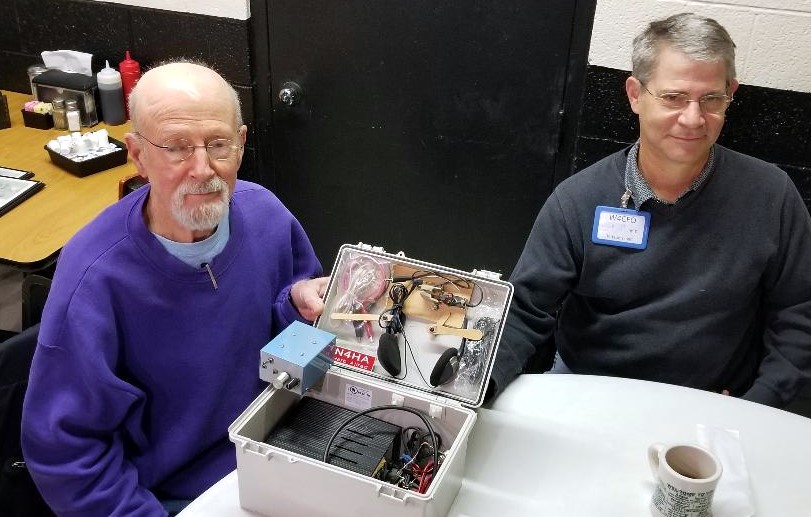
It was Saturday morning before Christmas, 2019, and seven local hams were gathered at the rear round table of Virlie’s Grill, Pittsboro, NC. Just the week before, John Mitchell, KK4VUR had distributed early Christmas gifts of nice surplus utility enclosures. BIG THANKS to John, KK4VUR !

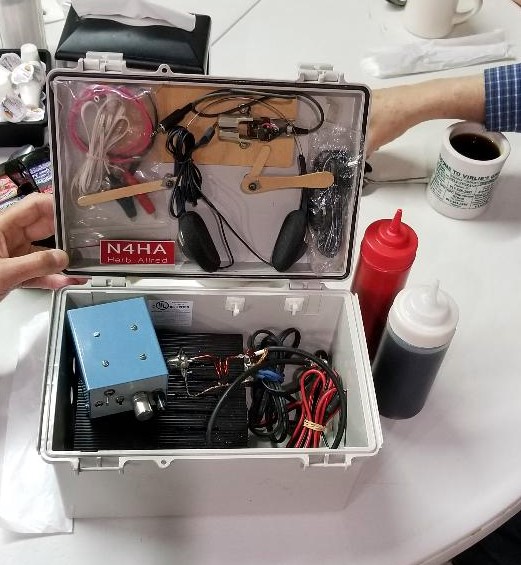
As part of the lively discussion this morning, Herb Allred, N4HA, revealed what he has already done with his utility box. Attached are photos of his “to go” station, with carrying handle attached to the top, containing his 20 meter CW QRP transceiver, antenna wire, iambic paddle, headphones and battery pack. The first photo shows Herb Alred, N4HA, on the left and Jim Davis, W4CFO, on the right. Note the use of popsicle sticks to secure the key paddle inside the lid of the box.

Very creative and ready to put on the air, maybe at a state park. Add a sandwich, drink and a few snacks in the box, (note the ketchup and maple syrup in the photo), and he is in for a good time.

Good luck Herb with many contacts and some DX. 20 meters has been better lately.

Don’t forget, Saturday mornings, 8:30 am (or earlier) at Virlie’s Grill, Pittsboro, NC (round table in the back of the room).

Best 73 and very MERRY CHRISTMAS to all and HAPPY NEW YEAR !

John, KX4P

Morse Code Classes via a UHF Repeater… starting January 8th

Steve Jackson, KZ1X

revised December 29 2019 ….

The way that most people learn Morse Code best is in a classroom style setting. From roughly 1840 through about 1970, this was the manner in which most people learned Morse Code.

For a variety of reasons, beginning in the early 1980s, a trend began where people either did not have the opportunity to attend a classroom setting and / or took it upon themselves to try and self-teach the skill. The former is unfortunate; the latter, many times more challenging.

Well, amateur radio certainly has changed in the ensuing decades but what has not changed is the desire among many hams to be able to use Morse Code on the air.

Due to practical limitations such as the lack of a suitable classroom venue, the geographically diverse nature of potential students, busy lifestyles, and availability of instructors, it is not likely we will see a return to regularly scheduled, local, sit-down type Morse Code classes.

However, for those who do wish to learn in a class-styled environment, and who already hold a Technician or higher grade of amateur license, there may still be an alternative for a group-oriented Morse Code learning environment.

A Proposal

OCRA maintains a wide coverage UHF repeater. Like the majority of repeaters over the past 15 years or so, it is inactive most of the time.

This terrific and underutilized resource could easily host a scheduled on-the-air Morse Code class for students already holding amateur licenses. This document describes such a class.

Conceptually, the idea is simply to move a traditional sit-down classroom experience to one conducted in real time via a repeater. By making it interactive, on the repeater, the class will train participants to communicate over-the-air in Morse Code.

Yes, that’s it. The sole goal of the class is conferring the demonstrable ability to send and receive Morse Code on the air.

Before you ask:

There is no sending or receiving speed goal for this class.

Setting such a goal was important in an era when there was a standardized FCC test to pass. Teaching to receive at a given speed did not serve students well; it only helped the test proctors. Moreover, without a sending test, the underlying Morse communications skill of the student is not certain.

Therefore, a fixed-speed goal is not appropriate for a Morse Code class taught in 2020. Think of this class instead like “Marconi meets Montessori.”

Anticipating your next question:

What speed are the lessons sent at?

The answer is:

Since the class goal is to be able to make practical use of Morse Code on the air, the so-called speed for lessons is actually a more complicated issue than a simple number.

The speed of the dots and dashes for lessons is set at the natural rhythm rate, such the listening part of the brain will not try to ‘count’ these symbols. Instead, each letter’s acoustic pattern gets interpreted by the brain as a unique musical sound. Thus, the same part of the brain used to remember the first notes of a favorite song is activated to memorize the letters.

This is also why significant effort has been put into making the tones used in the class have musical integrity (pitch, tonality, and harmonic content are controlled).

In turn, the space between the letters is artificially lengthened from the expected spacing, so that the student will have time to write down each letter sent.

Focusing on “how fast?” as the sole metric for success is great for horses, not for people. This is about recognition, not rate. Once one knows all the letters and digits, increased speed is then only a function of experience and desire.

How Will The Class Work?

A class participant will learn Morse code over a period of approximately two months. The letters of the alphabet, the ten digits, and certain punctuation and procedural signals are introduced to students each week, in a graduated process.

Materials used are a combination of a Windows software application by G4FON, the K1EL Morse Tutor keyer kits, and a weekly over-the-air interactive instructor-led lesson. The software is used to make the letter introductions, and to help weekly home practice.

Dividing the 26 letters into four groups allows one to learn the more frequently used letters first. In turn, this allows the most rapid progress towards forming words. Quickly thereafter, students can create simple sentences.

The class design is interactive because student participants both receive and send in each class, and draw upon each other’s success. All of this occurs exactly as it would in a ‘live’ in-person setting. It is therefore vitally important that the students faithfully complete each week’s homework and come prepared for the next class.

Classes, Equipment, and Software

Classes

The class itself consists of eight on-the-air lessons,  plus preparatory work.

Preparatory work consists of using the software to practice and learn the assigned new letters each week. Most people find that this will take from 1 to 3 hours per week. (Weeks 2 and 4 are hardest.)

Each on-the-air lesson will be roughly 30-45 minutes in length.

There is a fixed curriculum. One cannot ‘skip’ any lesson, nor are there any make-up lessons possible.

This is in part because the lessons are not simply recordings. They are interactive, and, each lesson builds upon the previous one. In addition, students are active participants in the learning process for and with other members of their cohort.

Each over-the-air lesson consists of a student-listening portion, and a student-sending portion.

  • In the student-listening portion of each class, the instructor reviews the new letters introduced the previous week, by sending the letters over the air to the students.

This listening portion consists of these most recent letters, sent in three sequences of ten random groups of four letters each. The instructor, using an automated tool, transmits these.

After the lesson, the actual letter groups sent will be posted on line, so students can check their copy.

  • In the student-sending portion, the student will formulate words from all the letters learned so far in the class, and then send those words over the air so other class participants can copy them. Each student will send at least two words (generally 4 or 5 letters each).

The student-sending portion of the class is one reason for the K1EL Morse Code tutor kits. These kits allow a low-cost way of sending good quality modulated-CW signals over the repeater.

If a student wishes to use some other Morse tone generation gear, that is their option. However, it will still be necessary to use the same settings as shown below (in the software topic), so that all class participants’ signals sound similar (pitch, speed, spacing).

The student will need to be able to hold their microphone close enough to their kit’s speaker so they can send their words over the air. Of course – they must ALSO access the repeater well while doing so.

Equipment

The intention is for the typical local, licensed amateur to participate in the class easily, with minimal additional expense.

An assumption is that all students will already have the means to access the repeater, often via a handheld radio. It is prudent to check one’s signal into the repeater from the location where one will participate in each week’s lesson, prior to starting the course. Adding an external gain antenna and perhaps a corded microphone accessory could be very helpful.

An in-person set-up session prior to the first class will be available, so that students’ K1EL Morse Tutor kits can be programmed. The reason for this is because the Morse Tutor kits are programmed using Morse Code, and of course, the student using this Tutor does not yet know Morse Code.

The programming will be for rates, student callsign, audio pitch, and related settings.

Software

The software used for the class is by G4FON. It is a Windows program. (If you absolutely must use some other platform, please contact Steve, KZ1X, to discuss options.)

Several features of this software make it the ideal choice. The primary one is the feature where the user can select specific letters for the computer to send, repeatedly, allowing the student to learn new letters every week according to the class syllabus.

Other G4FON program options allow the computer-generated Morse Code to ‘sound’ like the class lessons do.

To set up the G4FON software for the class, choose the following settings on the main screen:
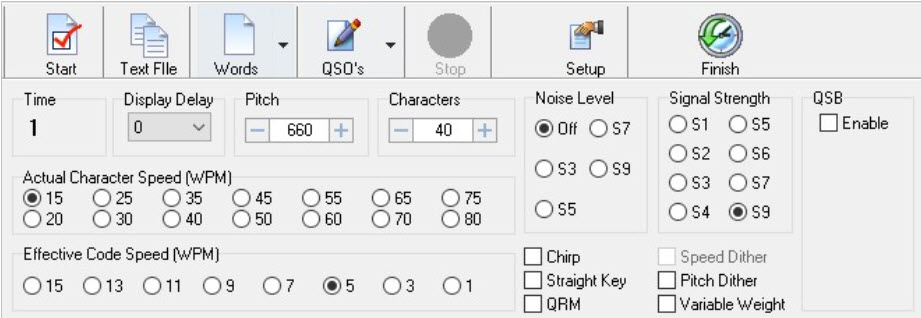
  • Set the Pitch to 660
  • Actual Character Speed to 15
  • Effective Code Speed to 5

and make any needed changes to the ‘button’ type options, as shown above.

Afterwards, open the ‘Setup’ tool and choose the “Morse Character Setup” tab:
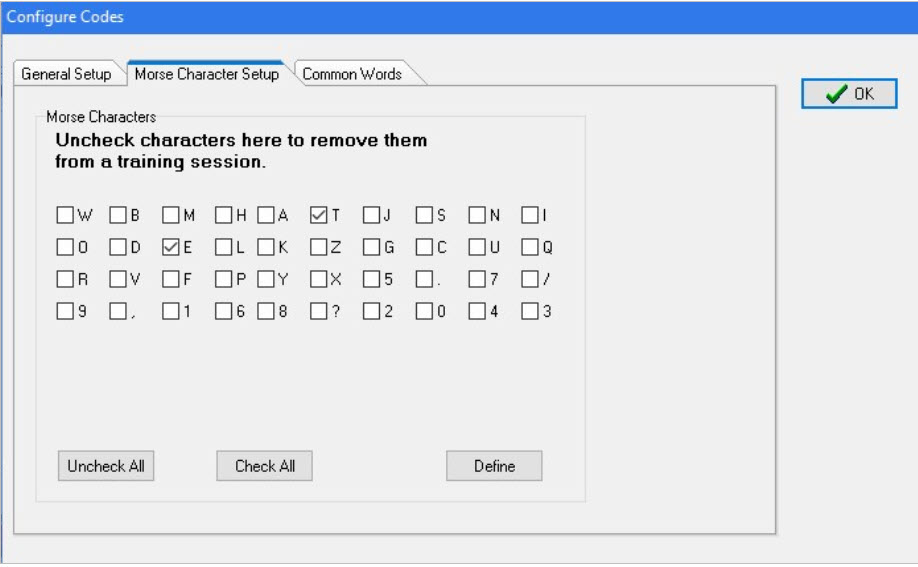
For the first lesson, choose only the letters ‘T’ and ‘E’ as shown above.
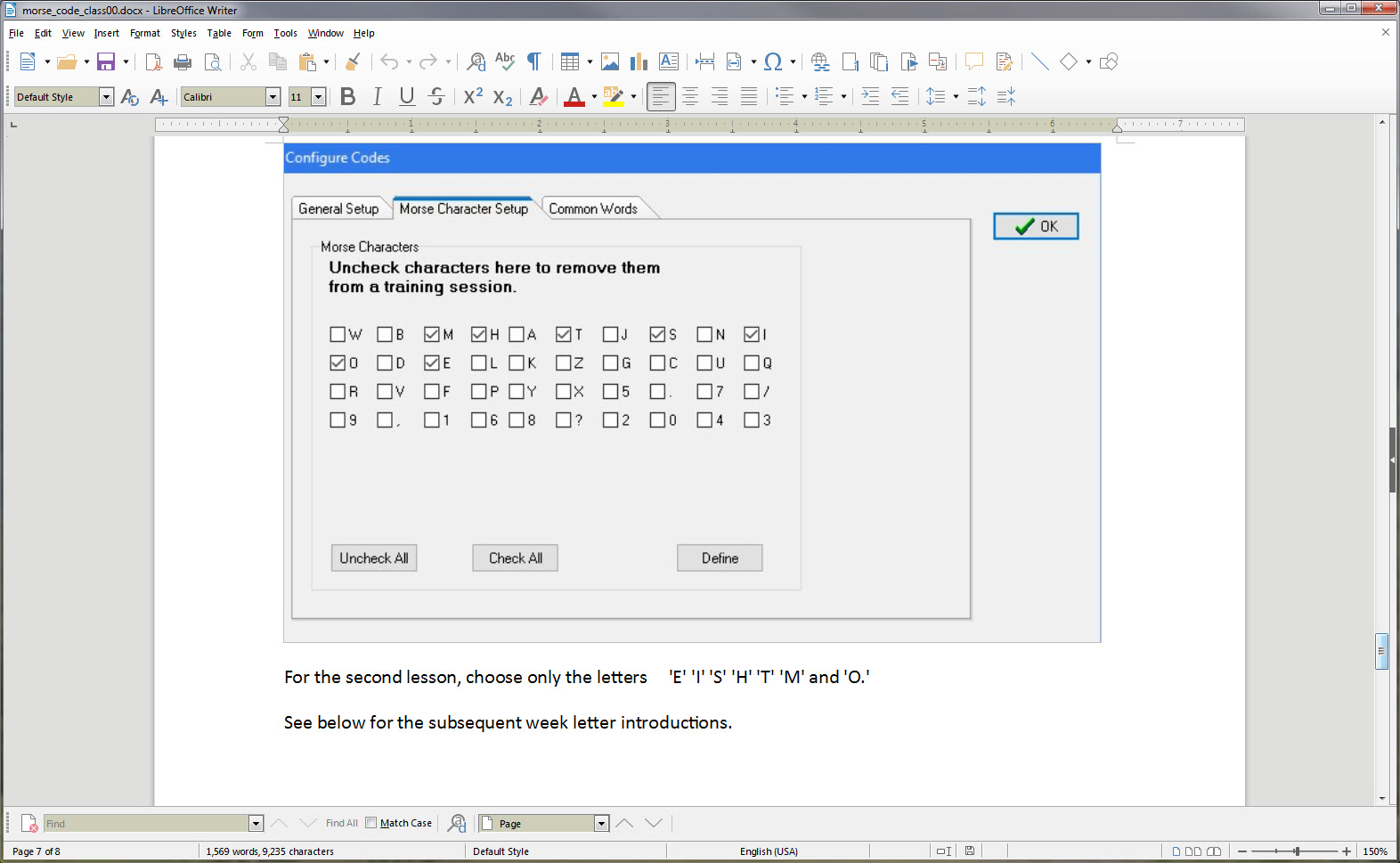
For the second lesson, choose only the letters ‘E’ ‘I’ ‘S’ ‘H’ ‘T’ ‘M’ and ‘O.’

See below for the subsequent week letter introductions.
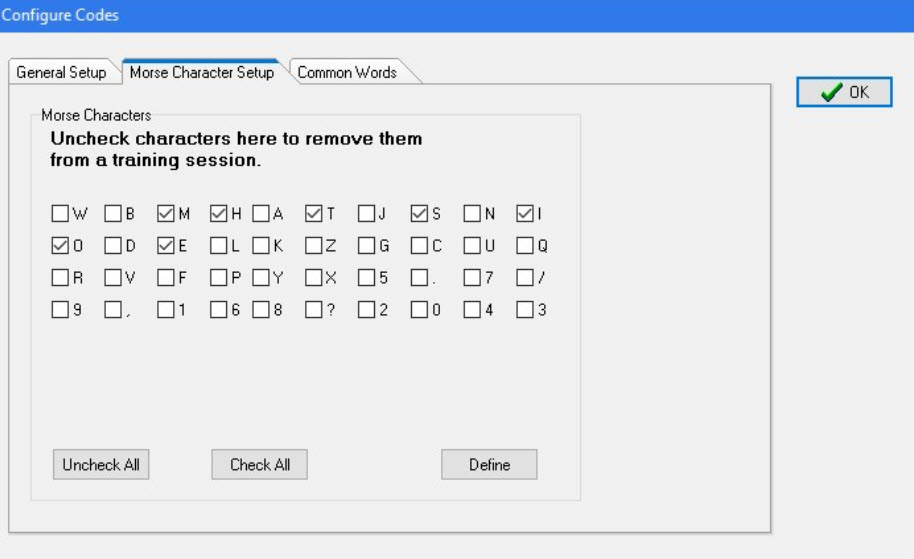
Here is a link to access the software:

http://www.g4fon.net/CW%20Trainer.htm

Lessons

Lesson 1 E T

Lesson 2 E I S H T M O

Lesson 3 A W J N D B

Lesson 4 U V G Z K R P X

Lesson 5 F C L Q Y

Lesson 6 1 2 3 4 5

Lesson 7 6 7 8 9 0

Lesson 8 . , ? /

Morse Trainer Kit Build; What Happened, and What’s Next?

by Steve, KZ1X

At the OCRA meeting (14 Oct 2019) there was a group build session for assembling the K1EL Morse Tutor kit club project.

Of the 25 or so kits involved in the project, approximately 6 were completed prior to the meeting! Those are our eager builders, and we’re lucky to have folks like that here to learn from. So few areas have such a rich experienced resource these days.

Another approximately 13 kits were assembled at the event.

More than a few assemblers were first-time kit builders, so, they get a special shout-out, as do the several experienced mentors present whose help was invaluable.

Since the success rate for the kits was effectively 100%, we can move to discussion of an evaluation of the event, and some next steps.

To start … It did seem like the participants were fully engaged and either re-learning their assembly skills, or experiencing them for the first time. This is certainly a good thing!

It would be great to get some additional and candid feedback on what went well – and what could be improved for some possible future event like this. Please feel free to share here or via direct email.

Now that many people have these kits built and operating, what comes next?

Several things, in fact, come next.

Immediately, please try and familiarize yourself with the settings on the Morse Trainer units you built. Pay particular attention to the setting that lets you control the sound pitch (tone) of the sending. You will want/need to be able to change this.

Also, work on learning TO CLEARLY SEND the first four letters of the lessons: E, T, A and N. Don’t worry about speed, it’s the smoothness that’s important to get down pat.

If you need to hear what these letters should sound like, I will be ‘playing’ them on the air, just after the ARES nets on Saturday mornings.

Lastly, don’t forget to remove the power jumper on your Morse Tutor when not in use, since the battery will drain if left on. That would take a month or two, but, no sense in running the batteries down for no reason. Simply unplug the jumper from the two pins and then re-seat it on just one, so you won’t lose it.

After that …

    1. The intent has been all along to offer weekly Morse tutoring lessons over-the-air via the 442.150 repeater … and in fact these were originally intended to start around now. There have been several setbacks to this plan, delaying the rollout by multiple weeks. I ask forbearance, all successful ventures take more time than originally anticipated.
    2. Group study events … did anyone notice the special feature of this kit, which allows people to pair-off and send Morse to each other in small group settings? The kits have a common RCA type jack on them, and with a simple phono male-male cable (which the club has several of if you don’t) they can be connected directly together! The MOST productive way to learn Morse is to first master a handful of characters (that is the purpose of the over-the-air sessions), make up words using just those letters, then send the code to a partner for practice. Then, reverse the listener and sender. These study events can be as few as two people, or up to MANY, and should take about 20 minutes each. The only catch is that there needs to be someplace people can go and have a quiet place for the study session. We’re spread over a very wide geographic area so this becomes challenging to manage. In an ideal world, we’d all have a weekly lesson session, and nobody would miss one. More realistically, those sincerely interested in learning the code can work with a buddy, perhaps one closer by than further, and help each other out getting to learn all 26 letters, ten digits, and a few punctuation and prosign characters.
    3. Computer aided training … there is Morse tutorial available called G4FON (the call sign UK ham who originally came up with it) and it’s available for PC, Mac, tablets, phones, you name it.In the next week or two I will send more information about this software and how to set it up to complement the coming training sessions.

For now… here are some links, see if you can install this software in your favorite device, and please report all successes or any gotchas:

http://www.g4fon.net/CW%20Trainer.htm for Windows
https://apps.apple.com/us/app/morse-elmer/id414371107 Apple iOS
https://play.google.com/store/apps/details?id=net.iz2uuf.cwkoch&hl=en_US Android OS

73

Steve KZ1X

Fall 2019 OCRA Club Construction Project

by Steve KZ1X

A few months ago I conducted an email ‘straw poll’ to gauge the interest in a club construction project.

It has been quite some time since the last such project.

The target date proposed for this project is the October 14, 2019 OCRA meeting.

This year’s idea was to build a very simple, but great quality and low cost Morse tutor keyer kit, and to back it up with over-the-air Morse lessons at some later date.

Response

The interest level in the kit itself was rather high, approximately 21 persons, and then others responding in ways other than via email. Some persons responding are DFMA members, as the email went out on the joint mail reflector.

Perhaps half the responders expressed concern about their electronics assembly skills.

They either were interested but felt it might be too complicated, many have never done anything like this before, they lacked the tools, were worried about success, or how to troubleshoot, needed help, and so forth.

Morse classes

The interest level in the Morse lessons was also high, higher than I expected. Some people wanted to get more proficient at their existing Morse skills and others wanted to learn from scratch. Still others already have Morse skills but just wanted to build the little kit!

Addressing the Concerns

To address the kit building concerns, at least two and possibly several more assembly workstations will be set up at the OCRA club meeting site, which for this session could start 30 minutes earlier than normal. The extra time would allow for everyone who wanted to, to get a chance to assemble and test his or her keyer.

Plenty of experienced builders are in the club and plan to attend this meeting, so there will not be any shortage of assistance.

To make sure the vendor can get the kits out in time, do not wait until just days before the event to order yours!

Project FAQ

  • Who makes this kit?

A small New Hampshire firm headed up by K1EL, a very well known ham whose call is almost synonymous with Morse keyer accessories.

  • How do you get a kit?

Order it from the link below.

  • How much does it cost?

The price currently is $22 plus shipping. The vendor is selling the kits quite near his raw parts cost, to assure it stays popular among newcomers to Morse. Another product sold by the same vendor, with similar functionality, costs almost 5 times this price.

  • How long does it take to get the kit?

About 4 or 5 days, here in NC. It comes USPS.

  • What else do you need to make the kit work?

Three AA size alkaline cells.

  • What tools do I need?

It is best to have needle nose pliers, a small flush cutter, solder, and a temperature-controlled soldering station. These links are just high-quality suggestions, for those wishing to equip one’s own new workbench. There will be tools available at the club meeting.

  • How long does it take to build?

Between 15 – 45 minutes, depending on skill level, equipment, pace, etc.

  • Are there any surface-mount type parts in the kit?

No.

  • What happens if it does not work?

That is not likely to happen, if you build yours at the club meeting there is a near zero chance to have this kit not work.

  • Can I get my kit and build it myself before the meeting?

Yes, of course, and then you can help others!

  • What do you get in the kit?

All the parts needed to make one complete keyer assembly, except for the AA cells.

The vendor also answers many of these questions, of course, including a complete description of what the keyer does.

Check out the kit web page at this URL:

https://www.hamcrafters2.com/K16tutor.html

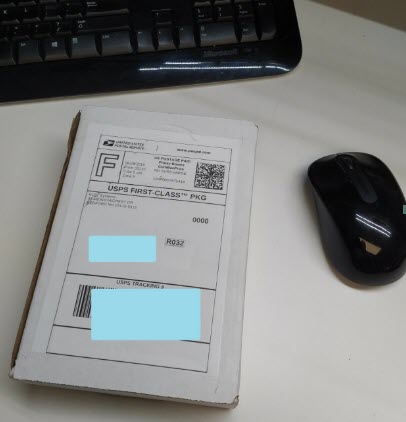
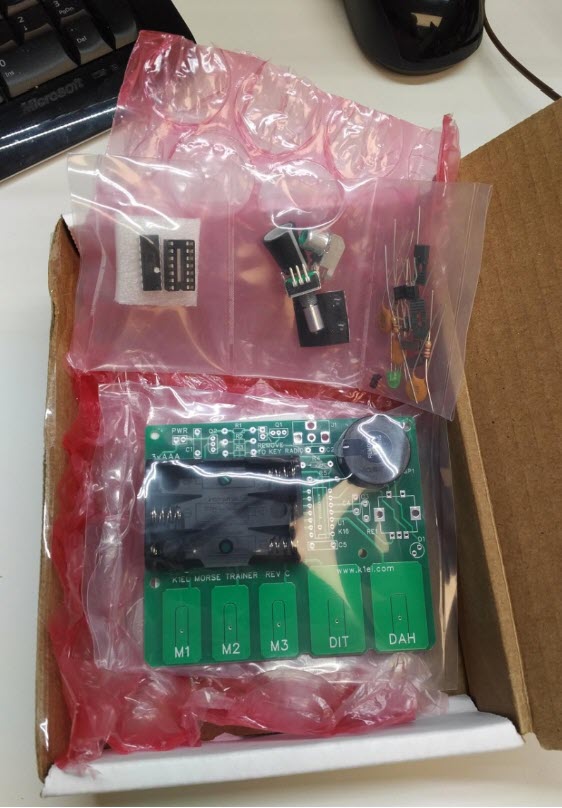
Here is a picture of the box as it comes from the vendor, located in New Hampshire.

The keyboard and mouse are shown for scale.

Inside the small white box are the circuit board and a bag with the parts needed to assemble the unit.

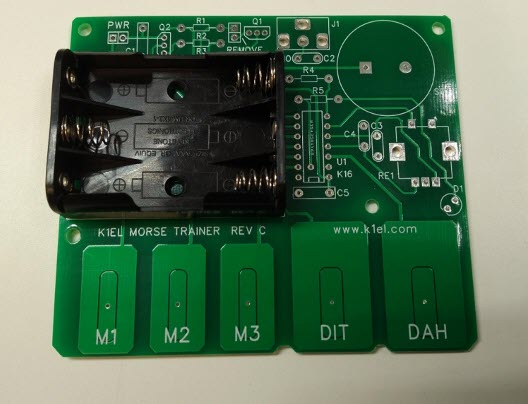
Here is what the unpopulated circuit board looks like, as you get it. (Yes, the AA cell holder is already mechanically attached, but NOT soldered.)

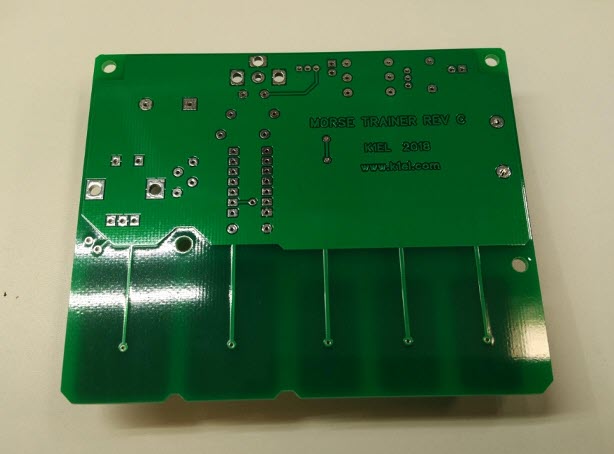
The bottom side of this circuit board, where the soldering takes place, looks like this:

There are approximately 54 individual solder connections to make.

Here is the bag of parts:

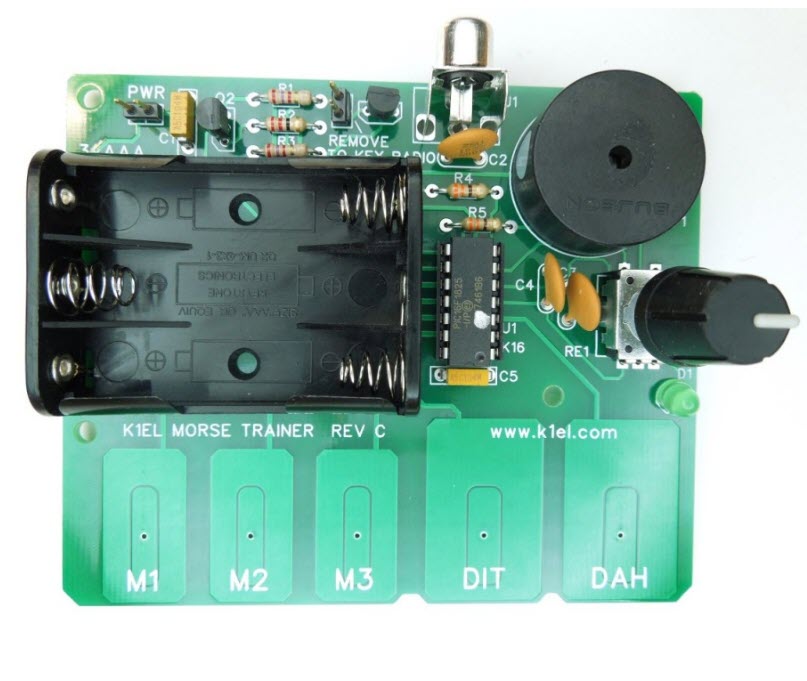
and when assembled, it looks like this:

The assembly manual is available from the link above, and there is a button to click to place your order.

Please post any questions you may have to the OCRA-DFMA reflector.

Looking forward to the October 14, 2019 club meeting and the construction project.

Steve KZ1X

2019 Field Day, OCRA Membership Meeting – July 8, 2019

Quote

Dave, W4SAR, club president opened the meeting with introductions, the topic for tonight’s meeting being Field Day results and call for officer reports.  In attendance tonight were 8 license-seeking candidates, one of our largest membership meeting testing groups.

Dan, KR4UB, treasurer reported 73 members are current with their dues with 26 members needing renewal. Club treasury balance is in line with ongoing expenses.

Nick, KA1HPM, stated two towers near Lowes hardware in Chatham County exist with antenna and feed-line.  Steve, W3HAL, and Dan, KR4UB, would assist in assessing the possibility of usage.

Field Day Results:

Dave, W3SAR, provided a Field Day point breakdown, and will post final results on this    website soon.  The unofficial count was 2997 QSO points, with 1727 QSO points awarded multipliers for a total of 14,985 points.  We had less points this year, but propagation was poor, except for 40 Meter.

Steve, KZ1X, proposed running 100 Watts rather than 5 Watts next year. While QRP, or low power…5 Watts, gets you multipliers, 100 Watts would allow more stations to hear, which would be more fun. Additionally, if sun spot activity is nearing a null, then 100 Watts may a sound strategy for the next couple of years.

Wilson gave thanks to Steve, W3AHL, for doing a great job on the N1MM network.  Steve, W3AHL, stated the 10 dedicated computers along with static IP addresses provided more resiliency and up time than last year. Wilson also appreciated John, KM4MDR, for doing a wonderful job managing the food preparation and service…at a’boys!

Additional Notes:

Dan, KR4UB, stated Phillips High School still has an antenna and transceiver used from an earlier ISS contact needing reclamation.  If interested in assisting, please leave a reply!

Finally, Dan, KR4UB, will present FT8 at the next DFMA meeting!

OCRA Board Meeting – July 2019

Attendance:

Steve W3AHL, Dave W4SAR, Karen KD4YJZ, Wilson W4BOH, Dan (KR4UB), Dee KU4GC, Keith W1KES, Lad W4ORD

Treasurer Report:

The checking and saving balances are in line with ongoing expenses. The pre-pay meal approach proved again very successful with 47 dinners and 34 breakfasts.  The more accurate head count for purchasing and preparing meals left little food with a net income of $93.

Field Day:

A big thank you to Wilson W4BOH and his family for hosting, John KM4MDR for providing Friday lunch and facilitating meal preperation, and all the other OCRA/DFMA members who assisted with set up, operation, and tear down.

Notable events:

  • Weather was very extremely favorable throughout the event
  • Computer network was reliable, thanks to Steve W3HAL efforts
  • The digi stations has some difficulty operating from the garage.  Will need to identify opportunities for another location next year.
  • Progation was very good with contacts made in Washington, California, and Hawaii
  • Satellite proved difficult as power overload from a few sites made contacts difficult for others
  • Consider using FT8 for kid contacts to avoid “mic fright”
  • Estimated contact points was 15,160, with bonus points was 17,310.
  • Further discussion need regarding Friday’s lunch as pre-pay

Please add your Field Day pictures and comments to the site.  We would enjoy sharing in your special moments.

Steve purchased automated external defibrillator (AED) battery and pads, which should be good for the next couple of years.

Nick KA1HPM secured call sign KAM for a special event station to honor Hiram Percy Maxim 150 birthday, co-founder of the ARRL.  The two day special event will take place September 2, from 8:00 AM to 8:00 PM.  Mark your calendars now!