Original post date July 2019 by W1KES photos by W1KES, © OCRA Inc
Category Archives: Field Day
2021 OCRA/DFMA Field Day Score – “preserving history…”
2021 OCRA/DFMA Field Day ARRL Score Totals
Thanks to all who not only worked 2021 Field Day, but went the extra mile in submitting (and correcting) submissions to make sure all our points rolled up as a single OCRA/DFMA Field Day Club submission
________________________________________________________________________________________________
                             from last July's post Field Day participant score submission effort....

The 2021 Field Day results below compiled from your email reports and, cross checking with the ARRL Submission site
indicates all scores have been correctly reported for a combined OCRA/DFMA club score. Your final review is needed
to make sure it is 100% accurate before further distribution. Please point out anything that needs to be corrected.

Copy me on any remaining ARRL Submissions or Corrections to http://field-day.arrl.org/fdentry.php

thanks, Dan KR4UB
ARRL Score Calculation Formula
[CW-CNT x 2 = CW Pts] [SSB-CNT x 1 = SSB Pts] [Digi-CNT x 2 = Digi Pts] ARRL Score = [CW + SSB + Digi Pts Sum) x Pwr_Mult + Bonus Points]
| MBR.FCC.ID_ | First | Station | Station_Band_Mode | Bonus_Activity | FDay Class | CW QSO | CW Mult | Digi QSO | Digi Mult | SSB QSO | SSB Mult | Pwr Mult | QSO Score | Bonus Score | ARRL Total |
|---|---|---|---|---|---|---|---|---|---|---|---|---|---|---|---|
| N4GF | Roger | Port able | 40M | Education, Emerg Pwr, Public Loc, Youth Ops, Web Submit | 1, A, B | 4 | 2x | 5x | 40 | 370 | 410 | ||||
| WA2JLW | Roy | Home | 80M, 40M, 20M, 15M, CW | Emerg Pwr, Web Submit | 1, E | 82 | 2x | 5x | 820 | 150 | 970 | ||||
| WB4OSU | Sherri | Home | 40M, 20M, WSJT, PSK31 | Emerg Pwr, W1AW Msg, Web Submit | 1, E | 79 | 2x | 5x | 790 | 250 | 1040 | ||||
| N2XZF | Paul | Home | 20M, 10M, SSB | Emerg Pwr, Web Submit | 1, E | 32 | 1x | 2x | 64 | 150 | 214 | ||||
| KX4P | John | Home | 80M, 40M, 20M, 15M, 10M, CW, SSB, WSJT | Web Submit | 1, D | 239 | 2x | 2x | 956 | 50 | 1006 | ||||
| WA4PSC | Howard | Home | 160M, 80M, 40M, 20M, 15M, 10M, CW | W1AW Msg, Web Submit | 1, D | 1369 | 2x | 2x | 5476 | 150 | 5626 | ||||
| N4JQR | J R | Home | 80M, 40M, 20M, 15M, 10M, 6M, SSB | W1AW Msg | 1, D | 60 | 1x | 2x | 120 | 50 | 170 | ||||
| W1KES | Keith | Home | 80M, 40M, 20M, 15M, 10M, 6M, WSJT | Web Submit | 1, D | 114 | 2x | 2x | 456 | 50 | 506 | ||||
| W4KIL | Andy | Home | 40M, 20M, 15M, 10M, 6M, WSJT | W1AW Msg, Web Submit | 1, D | 213 | 2x | 2x | 852 | 150 | 1002 | ||||
| KR4UB | Dan | Home | 40M, 20M, 15M, 10M, WSJT | W1AW Msg, Web Submit | 1, D | 426 | 2x | 2x | 1704 | 150 | 1854 | ||||
| N4KW | Pete | Home | All, CW, SSB, not sure about 2023 | Web Submit | 1, D | 356 | 2x | 163 | 1x | 2x | 1750 | 50 | 1800 | ||
| N8BR | Bill | Home | 80M, 40M, 20M, CW | W1AW Msg, Web Submit | 1, D | 641 | 2x | 2x | 2564 | 150 | 2714 | ||||
| KO4DHJ | Ken | Home | 80M, 40M, 20M, SSB | Web Submit | 1, D | 45 | 1x | 2x | 90 | 50 | 140 | ||||
| Mark | Home | 40M, 20M, 15M, SSB | W1AW Msg, Web Submit | 1, D | 207 | 1x | 2x | 414 | 150 | 564 | |||||
| KY4HU | Charles | Home | 40M, 20M, SSB, WSJT | W1AW Msg, Web Submit | 1, D | 123 | 2x | 5 | 1x | 2x | 502 | 150 | 652 | ||
| K1ZW | Larry | Home | 20M, 15M, 10M, SSB | Web Submit | 1, D | 14 | 1x | 2x | 28 | 50 | 78 | ||||
| KZ1X | Steve | Home | All, CW, aka W4EZ | Web Submit | 1, D | 123 | 2x | 2x | 492 | 50 | 542 | ||||
| KO4TXN | Steve | Home | All, SSB | W1AW Msg, Web Submit | 1, D | 160 | 1x | 2x | 320 | 150 | 470 | ||||
| KJ4VWG | Sam | Home | All, SSB | W1AW Msg, Web Submit | 1, D | 73 | 2x | 81 | 2x | 454 | 150 | 604 | |||
| N1LN | Bruce | Grp_1 | Captain, 80M, 40M, 20M, 15M, 10M, CW, aka NC4KW | W1AW Msg, Web Submit | 1, D | 1351 | 2x | 486 | 1x | 2x | 6376 | 150 | 6526 | ||
| N1YXU | Laurie | Grp_1 | All, SSB, aka NC4KW | 1, D | 486 | 1x | 2x | 972 | |||||||
| W4BOH | Wilson | Grp_2 | Captain, All, CW | Web Submit | 2, D | 623 | 2x | 37 | 1x | 2x | 2566 | 50 | 2616 | ||
| KN4VXB | Aurora | Grp_2 | All, SSB, aka W4BOH | 2, D | 36 | 1x | 2x | 72 | |||||||
| NA4VY | David | Grp_3 | Captain, All, SSB, WSJT | Web Submit | 2, D | 222 | 1x | 2x | 444 | 50 | 494 | ||||
| William | Grp_3 | All, 20M, SSB | 1, D | ||||||||||||
| K4SAR | Joe | Grp_4 | Captain, 80M, 40M, 15M, 10M, SSB | Emerg Pwr, W1AW Msg, Web Submit | 1, E | 491 | 1x | 2x | 982 | 250 | 1232 | ||||
| KI4RAN | William | Grp_4 | All, SSB | 1, D | |||||||||||
| KD4YJZ | Karen | Grp_5 | All, SSB, PSK31 | 1, E | 105 | ||||||||||
| KU4GC | Dee | Grp_7 | Captain, 80M, 40M, 20M, 15M, 10M, SSB, WSJT | W1AW Msg, Web Submit | 2, D | 309 | 2x | 40 | 1x | 2x | 1316 | 150 | 1466 | ||
| KF4PAB | Lenore | Grp_7 | aka KU4GC | 2, D | |||||||||||
| KM4MBG | Jack | Grp_7 | aka KU4GC | 2, D | 2x |
________________________________________________________________________________________________
Orange County Radio Amateurs & Durham FM Association ARRL Submission Score to date : 35,560
CW QSO Total Count : 5,009, Digi QSO Total Count : 1,850, SSB QSO Total Count : 2,589, Bonus Activity Points : 3,520
31 Hams on 2021 Field Day N1LN Sign Up List, 12 Group Station Participants, 18, Home Stations, 1 Portable Station
________________________________________________________________________________________________
OCRA Membership Meeting – June 10th, 2019
Quote
Original post date June 2019
Dave W4SAR, club president opened the meeting with introductions, the topic for tonight’s meeting being Field Day Planning and call for officer reports. He reported that at the last VE Session on June 8th, 6 candidates were tested with 5 passing the exam earning their license.
Dan, KR4UB, treasurer reported 74 members are current with their dues with 25 members needing renewal. Club treasury balance is in line with ongoing expenses.
Dan also covered the need for attendees who plan to have a Saturday dinner or Sunday breakfast meal from the field day grill to pre-pay for the food to be purchased on their behalf. Costs for some food items have increased as much as 15% from last year and we need your help in keeping the cost per meal low.
Nick, KA1HPM made an announcement of a request he had made to the ARRL via Carl Bowman, Section Manager requesting that an ARRL contest be organized to celebrate the 150th birthday of Hiram Percy Maxim on September 2nd, 2019. The ARRL responded with an alternative option of a Special Event Station be set up to celebrate the event. Nick made the call for volunteers to set up and run such a station, using his call sign KA1 H(iram) P(ercy) M(axim) on September 2nd from 8am to 8pm.
Next, Dave W4SAR began the planning discussion for the 9A class battery powered 5 watt station operation for 2019 OCRA/DFMA Field Day to be held at the Wilson, W4BOH QTH on 3117 Moorefields Road , Hillsborough.
Starting Friday morning at 8am focus will be on tower setup and all other outdoor ground activity to get as much as possible done prior to mid day heat.
Stations and Band Captains are as follows:
- CW Stations – Bruce N1LN Captain – 3 stations located inthe MCU covering 80 -10M CW operating antennas onf 3 towers. 2 sets of headphones are on each radio so interested observers can listen in on the operation. Operator slots are available.
- 80M SSB Station – Steve, W3AHL Captain – located in the W3AHL motorhome using two 75M dipoles. Typically band conditions mean 75M is a 6pm to 6am operation. New operators are welcome.
- 40/15M SSB Station – Joe, K4SAR Captain – located in an air conditioned trailer using a 3 element 40M wire beam and 3 element 15M beam. Joe needs operators to sign up.
- 20M SSB Station – Lad, W4ORD Captain – located in an air conditioned trailer using tower mounted team, solar power charged batteries.
- 10M SSB/Digi Station – Dave, NA4VY Captain – located in the air conditioned “red barn” using a Moxon beam.
- 40/20M Digi Operation – Dave, W4SAR & Sherri, WB4OSU are co-captains operating PSK-31 and maybe FT-8 located in the handicap accesible garage at the food area.
- 6M VHF Station – Doug, KA5ETS principle operator also located in the “red barn” building.
- Satellite Contact: Dan KR4UB & Bill N8BR will be out on the grounds at the scheduled times for satellite overflights.
Additional operators are needed on all stations.
Bonus Point areas were covered next. Volunteers signed up for the various areas are listed OCRA website home page.
Bruce, N1LN then gave a presentation and demo of the N1MM logging software to be used at field day. The presention is available on the OCRA website home page.
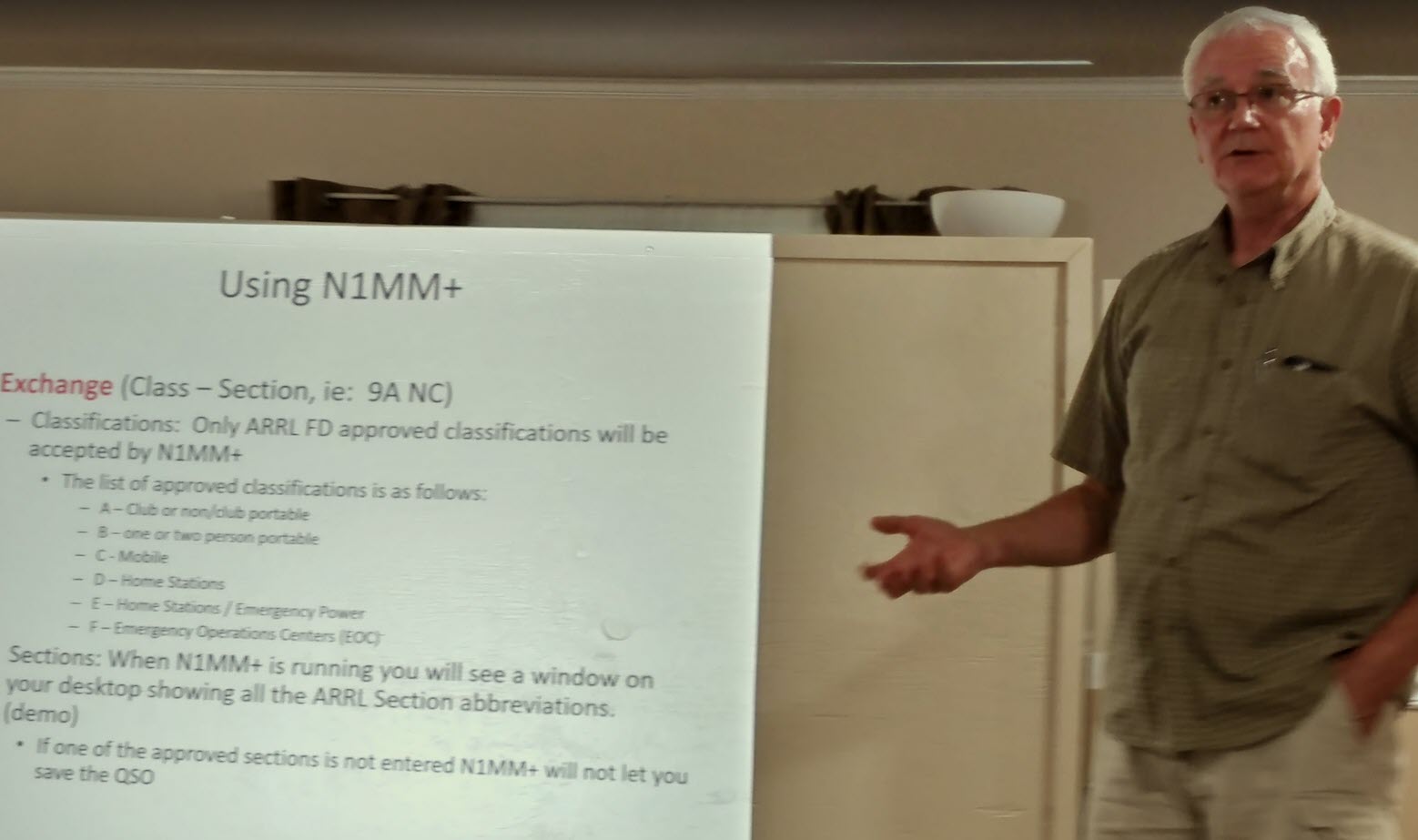
Steve, W3AHL discussed the networked logging setup using the pre loaded and configured laptaps that will be available to each station. All stations need to be ready to participate in the isolated WiFi network setup test at 9AM Saturday morning.
Dan, KR4UB filling in for Keith, W1KES club secretary.
2021 OCRA/DFMA Field Day – Logging Contacts, Bonus Points, Maximizing Score
More useful information for 2021 Field Day from Dave W4SAR, originally posted June 2020 for our first 1D/1E “at home” Field Day
Hi All from Dave, W4SAR,
In my last post, I wrote a bit about how Field Day works, and what the information exchange consisted of. Here I will talk about recording those contacts, strategies to maximize the number of contacts, and using multipliers and bonus points to get yourself the biggest final score. My next and final message in this series will go over the submission of your final score to the ARRL.
First off, though getting the maximum score you can is the primary goal of any amateur radio competition, it is not the only goal. You need to make it an enjoyable experience for yourself, and learn a few things in the process so you can do it better later on. In other words, don’t obsess about not getting 500 QSO’s, glory in making your first contact, your 10th contact, your 100th. Hey look I just worked South Dakota! Look , I just worked N1LN on three bands! Set yourself some fun goals, and celebrate them with us. We’d love to see how you are doing on Field Day, post messages to this reflector so everyone can see each other’s accomplishments.
Now on to LOGGING:
Logging your contacts:
You need to preserve a record of the contacts you have made, your logging entries will be the exchange information of the stations you had worked, and the time you worked them. It is best to use UTC, Coordinated Universal Time, rather than local time, that avoids the problems of logs listing a variety of local time zones, in short, everyone will be on the same page for time signatures. Field Day will run from 2:00pm local time on Saturday, June 27 to 2:00 pm local time on Sunday June 28. In UTC, that translates to 1600 hours Saturday to 1600 hours Sunday.
If you are logging by computer, make sure your computer is set to the correct local time and date. Electronic logging programs have the ability, based on local time, to correctly record the entry in UTC, but you will need to check your settings to make sure that the time offset is correct.
For those of you performing paper logging, I suggest setting a digital clock to 24 hour format, and then set it to UTC.
Here is what a string of log entries should look like, it will have the time/date in UTC, callsign, station type and location of the station worked:
1601 6/27/2020 N1LN 2E NC
1605 6/27/2020 W2LOP 5A NNJ
1608 6/27//2020 N6HHI 1D LAX
1611 6/27/2020 XE1L 1D DX
1615 6/27/2020 W3AO 45A MDC
1616 6/27/2020 VE1AA 1E GTA
Notice that the locations are abbreviated to 2 or 3 characters. Electronic logging programs will have this standard list ready to plug in (more on that later). For paper loggers, on page 47 of the PDF packet for Field Day is a list of the ARRL/RAC sections and their standard abbreviations, I suggest printing it out for reference. There is a misconception that we may only work stations from the USA (and it’s territories) and Canada. Not so! You will notice a station from Mexico in the list above. Just mark any station outside the USA and Canada as “DX”, if they don’t provide a correct station type, just ask them if they are a home station using commercial or emergency power, and mark it down accordingly, a little bit of work, but it nets you another QSO point.
Electronic Logging:
Likely most of us will do this as it offers a number of advantages, especially when you have managed to work a few hundred contacts. Among those advantages are:
Backing up of information- most will automatically back up at set intervals, Additionally, you can backup to a USB drive as often as you like. I do this on a frequent basis just in case the laptop crashes.
Duplicate checking- When you type in the callsign, it will automatically warn you that you had already worked this station. saving you time so you can move on. If you ignore the warning, most will not let you make the entry.
Autofill- If you have already worked a station on another band/mode, when you type in the callsign it will automatically y fill in the station type and location. Again, a time saver (BTW, working the same stations on a different band or mode is not a Duplicate entry).
Statistics- If it interests you, you can see how quickly you are making contacts and see how many you are making on different bands/modes. A fun one for me is looking at the map of the USA and Canada and seeing it fill in with locations I have worked.
Report generation- I will cover this in my next posting regarding submission of final scores to the ARRL.
By far, the most popular electronic logging programs are N1MM, and N3FJP, there a few others out there , but I am not familiar with them. Those of you who are Excel capable can also like set up a spreadsheet for logging, including Duplicate checking. I will speak to the two I know:
N1MM- Probably THE most popular amateur radio logging program. It is an open-source collaboration, and the price cannot be beat, it is FREE. It is fully capable in dupe-checking and autofill and statistics, you can customize the windows, and generate a Cabrillo file for your report (again, more on that later). If you are new, there is a bit of a learning curve on using it. Bruce, N1LN, is probably our best local resource regarding the use of N1MM. He can answer questions, but with less than a week to Field Day, I don’t see us having much , if any time for a clinic on this. I you want to use it, the download is free, as are any updates. If you already have it,make sure you have the latest update before using it for FD 2020. Keep in mind that when we go back to regular Field Days as a large group, this is the program we will use.
N3FJP- I have used this one for many years, until I started learning to use N1MM for the past few years. As I am operating my station by itself, I am once again using the N3FJP Field Day Logger. It is not free, you can download and test drive it for up to 20 QSO’s, but to validate it for perpetual use, the licensing fee is quite reasonable at $8.99. The interface, in my opinion , is more user-friendly for a new user, the template is dedicated for field day . So just set your laptop correct local date and time, use the settings to input your callsign, station type, and location. Then, just plug in the info from your QSO’s as they come. The report generation id Field Day dedicated, so a summary sheet and dupe sheet can be readily generated for that final submission. I am very familiar with this program and can be a resource if anyone wants to go with it.
One other thing with these programs is to make sure to have it set for input on the same band and mode you are working (i.e. 20 M Phone , 40 M CW, etc). when you change bands or modes on your radio, be sure to match the change on your logging program, or you will have Dupes flagged incorrectly or have new QSO’s with incorrect information. I speak to this from experience.
Paper Logging;
If you just plan to casually work Field Day, and don’t plan on lots of contacts, or just plain don’t want to use a computer while working that radio, you can go old school and just do paper logging. Page 46 of the PDF for the FD information packet (downloadable from the ARRL website) has a logging template you can print out and use. Again , the info is the time of contact in UTC, callsign, station type , location, and what band and mode was used. However, you would be on your own for duplicate checking. If you have a short list, you can just scan it to see if you already worked that station. If you have gone to multiple pages, this is more difficult and time-consuming. The ARRL has not recently added the manual dupe sheet to their info packets, with so many now doing computer logging. However, I have found the old template from years past and will attach it to this message. It is a grid divided up by call sign prefixes and call zones . Just fill in the call sign suffix on the proper grid square. Now you have a quick reference you can scan for duplicates. For the final report, you will have a bit more work than most, to be covered later.
Multipliers:
Each QSO by phone that you log is 1 point, whereas QSO’s by CW or Digital modes count as two points each. Additionally , there is a multiplier applied to these based on power level used and power source. The multiplier applies to the highest power level used by that station throughout Field Day, you cannot break them down between power levels.
5X Multiplier- 5 Watts maximum output at the feedpoint for your coax AND power source other than commercial grid or fossil-fuel driven generators. By definition, this would only apply to Echo Stations (home station using emergency power), or Bravo stations if any of you are doing that. So with a 5X multiplier, each phone QSO equals 5 points, each CW or Digi QSO equals 10 points.
2X Multiplier- If your power output at the feedpoint will be between 5 and 150 watts, the 2X multiplier applies for all station types. If you are a Delta station (home station using commercial grid), your multiplier remains 2X even if you are using 5 Watts or less. Phone QSO’s equal 2 points, CW and DIGI are 4points.
1X Multiplier- Between 150 and 1500 Watts.
The multiplier is up to you, based on your capabilities and strategy. If you have really efficient antenna systems, going for 5X is an option, as that strategy is what helped our FD operation place so high in the rankings. But you will hear a lot of stations that will not hear you.
I personally plan on going with the 2X multiplier, since I only have a G5RV multiband wire antenna and a 1/4 wave vertical for 40 meter digital to use. The strategy is that I’d make more then 2.5 X the number of contacts at this power level to make up the difference from a 5X multiplier at QRP levels.
As for the 1X level, they will be heard! When the lights brown out in Orange County, that is Bruce and Laurie keying down.
Bonus points;
In addition to QSO points, there are bonus points to add to the score (multipliers do not apply to these). The information packet goes into detail on these, I will just do a quick run-through on those that apply to home stations (Deltas and Echoes).
Emergency Power- 100 point bonus for each transmitter using emergency power only for entirety of Field Day (100 points for one transmitter, 200 for two, and so on).
Media Publicity- sending out a notice to news media about your station. You need to retain a copy of the press release and who you contacted for documentation, document any media response. 100 points
Message Origination to Section Manager- report on your station , number of personnel, ARES personnel. Must be sent via RF. 100 points.
Message Handling- 10 points for each message sent through traffic nets, up to 100 points.
Alternate Power- at least 5 QSO’s made using anything other than direct power or battery power derived from the commercial power grid or fossil fuel driven generators. Examples are solar panels, batteries charged solely by solar panels, manually driven generators, fuel cells etc. Document which QSO’s in your log were done vis Alternate power.100 points
W1AW Field Day Bulletin- These are generated by phone, CW and digital modes. Copy must be submitted for documentation. See the ARRL FD Info packet for the schedule. Personally, I use PSK 31 to copy the message, and then cut and paste it into a Notepad file for documentation. If you go by phone, try to record it for transcription. Tip- The bulletin is first put out on the Friday evening before FD itself, it is a good time to catch it and it is perfectly within the rules to do so. 100 points
Elected Official- If you can get one to come to your QTH, document it. 100 points.
Served Agency Official- A visit to your QTH by any representative of an agency served by ARES, these include Emergency Management, American Red Cross, Municipal Fire Departments. 100 points
Youth Participation- 20 points for each operator 18 years of age or younger at your station, up to 100 points total. You must document Name or Call sign and age of each youth op, and document which QSO’s are theirs on your log (at least one QSO for each).
Web Submission- Using the ARRL’s web interface to submit your final score (details later). 50 points.
Other bonus points are available only to Class A, B and F stations. Unfortunately, the 100 point Satellite contact bonus does not apply to home stations. But you do get the hugest of bragging rights.
I will add the ARRL Field Day Info Packet and the Dupe Sheet template to the files section of this IO group. I can also email those directly to anyone that requests them.
Okay, my next and last message will go over the final submission of scores, and maybe a few more operating tips. Stay tuned.
73,
Dave Snyder, W4SAR
_._,_._,_
2021 OCRA/DFMA Field Day Announcement
Quote
If you received the May copy of QST, you probably read that, due to ongoing health and safety concerns, the ARRL has extended the COVID-19 pandemic-modified ARRL Field Day rules from 2020 to apply to this June’s Field Day event. Due to the extension of the ARRL rules waiver and club members raising concerns about the dangers of large group gatherings, the Board of Directors of the OCRA/DFMA clubs have made the decision to not host and sponsor a large, joint Field Day operation this year.
Fortunately, this decision does not mean that members of the OCRA and DFMA clubs will be excluded from operating Field Day. However, it does mean that we will need to modify the ways we participate and accommodate changes from our traditional in-person, multi-station event.
Specifically, it means that members will be encouraged to participate in Field Day from home stations, as they did last year. As an alternative to this scenario, several club members have expressed interest in getting together in smaller groups to operate in Field Day.
The next step in understanding the membership plans will be to collect information about operations. To do this, information will be collected from three sources – this email reflector, the OCRA Saturday morning AUXCOMM net, and the DFMA Thursday night net. A separate email will be sent to this reflector that will include examples of the information that will be requested and collected. The summary information will be collated and distributed.
Last year, the combined score of the OCRA/DFMA Field Day activities put us in the top 10 nationally. Hopefully, this year we will be able to do well again. As with last year, your individual scores can be aggregated into the overall OCRA/DFMA club total. More instructions will be communicated in June informing all OCRA/DFMA Field Day stations the steps that will be required to make this happen.
In closing, we hope this COVID-19 pandemic will be behind us for next year’s Field Day event. We all want our lives to be back to as normal as possible, with one of those normal actions being a large group, single location Field Day 2022.
Regards,
OCRA/DFMA Board of Directors
2020 OCRA/DFMA Field Day – Some Field Day Miscellany from Dave, W4SAR
Quote
Not yet the promised message on submitting your scores, that will come soon. BTW, you have a full month after Field Day ends to get your scores submitted. Instead, for this message I am adding a few more tips on Field Day operations and rules.
Test your stations, as soon as possible. Better to find out that your antenna will not load on 40 meters, or that your Digital setup is not putting out any power now, so that you have time to remedy it, rather than at the very start of Field Day itself.
Remember that if you are using the emergency power bonus, that if you are using a computer to control the radio, or using it to modulate digital modes, it is considered an integral part of your station and must be on emergency power also. On the other hand, if your laptop is used just for logging, it is considered auxiliary equipment, in which case leaving it on commercial power is fine.
If you are guest operating at another person’s station, and then going home and operating your own station, you are not allowed to contact the station at which you have worked.
All digital modes are equivalent. If you work someone on FT8, you cannot come back on PSK31 and “double-dip”.
Remember that working the same station on different bands is not a duplicate contact, neither is working a station on the same band by different modes (phone, CW, digital). i.e 5 bands X 3 modes can be 15 legal contacts with one station.
Chase the propagation, 20, 15 and 10 meters are primarily daytime bands, 40 and 80 better at night, but there is often overlap. With the solar index being bad right now, 10 meters will likely not be reliable, but be prepared for openings. If your run is slowing down on 20 meters, take a quick look at 15 or 10 meters for activity. This easier if your radio has dual VFO’s as you can look at other bands quickly and if nothing is happening, go right back to where you were working. I would also suggest that club members notify us on the email reflector of any openings they see on the bands.
Mix up your operating, you can “hunt and pounce” up and down a band, when that tails off in productivity, find a quiet spot if you can, and call CQ.
Make sure that battery is topped off, best is having another one or two topped off and ready to swap in.
For Digital communications, if you are not running QRP, 25 Watts is plenty for modes that favor weak signals such as PSK31 and FT8. Digital modes have heavy duty cycles on transmit, that heat sink will get pretty hot if you run 100 Watts. Besides, you’ll extend battery usage keeping that output power down.
Back up electronic logs frequently on a USB drive. You can back up paper logs by photographing them with your smart phone, or use the copy or scan function on a printer.
Anyone else have any tips? Reply to this message so we keep them handy in one thread.
Dave, W4SAR
_._,_._,_
2021 OCRA/DFMA Field Day Operating Tips
Gallery
This article by Dave, W4SAR originally posted June 2020 for our first 1D/1E “at home” Field Day was used for planning the 2021 OCRA/DFMA 1D/1E Field Day Hi All from Dave, W4SAR So pleased to see so many of us … Continue reading