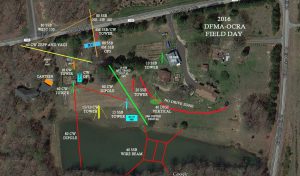
We are a little under 4 months from Field Day 2017, so we need to start our initial planning.
Of course, some things will be the same, OCRA and the DFMA will run a joint operation. The Lamb Family once again will be hosting the location, we will again run an “Alpha Battery” club operation. That means transmitted output will be no greater than 5 Watts, all transceivers will be on on battery power. How many stations we run will need to be determined, returning band captains get the “right of first refusal”, and then we can fill slots for non-returnees as well as welcome some trying something new. We do get 100 bonus points for each HF station on emergency power.
Now for some of the changes:
Food- Fear not, we will still be eating well! However, after many years of hard work and excellent service, Dee KU4GC and M.K. W4MKR are bowing out of running our field canteen. They are willing to give advice but no longer wish to do the heavy lifting. I believe a committee needs to be formed right away to carry on the planning and staffing of our field canteen. This will be to provide two meals during Field Day operations, a Saturday dinner and a Sunday Breakfast, as well as have water , soft drinks and snacks available throughout the weekend. John KM4MDR has volunteered to coordinate the huge potluck which is held on that Friday night, which is one of the two largest social events we hold each year (the Holiday Dinner being the other). If you have an interest in working on the committee, let us know!
Logging- The other change will be in how we will be logging results. In the past , we had used several different logging programs with a ADIF output capability. The output was never completely compatible, so not all of the logs would integrate into the master log. This meant many hours of editing and formatting had to be done by me to pull a master log together. The CW operators have been using the N1MM freeware logger, which allows multiple computers to simultaneously make log entries via a wireless connection. I asked if this capability could be extended across the whole Field Day site, and it can be done. If the entire Field Day operation enters into one master log, my work in preparing our FD submission will be much easier. You would also be able to watch the results for the entire operation in real time. This means that all logging computers must have wireless capability. Also, all of us will have to learn how to use the N1MM software. Bruce, N1LN has agreed to give a tutorial at an upcoming meeting, I am looking forward to that.
Bonus Points- One reason our closest competitor in California keeps beating us, is that they strongly pursue all the bonus points they can get. Some members in the past have taken on various bonus activities. I strongly recommend that we put together a bonus point committee to help coordinate these activities, and explore ways to get even more points added without overburdening anyone.
As always, I eagerly anticipate our operation. We have a corps of dedicated, technically gifted amateurs, who enjoy each other’s company, I can’t wait to see what we come up with this year!
73– Dave W4SAR
 tab to go to the photos home page. You will see several albums already on the site e.g. 2018 OCRA/DFMA Field Day, 2018 Field Day Potluck, and others.

 and the Upload Photos window will open.