> Subject: Please publicize my upcoming General Class Oct 28
> Folks:
>
> I would appreciate your help getting the word out about my free weekly General Class licensing course on Zoom beginning Thursday, October 28 and running through Thursday, January 13 (9 sessions plus 3 weeks off for the holidays in November and December.) Sessions will start at 6:30 pm eastern time, and run 3 hours. These are the classes sponsored by the National Electronics Museum that we have been holding for years. Please publicize this with anyone you know that you think would be interested. Those wishing to sign up should email me at roland.anders@comcast.net.
>
> Thanks,
>
> Rol, K3RA
Category Archives: Announcements
Tonight’s OCRA Christmas Party rescheduled due to Weather Conditions
Attention!
Due to concerns about the weather forecast and impending snow, The Christmas Party scheduled for tonight, Monday December 8 will be changed to Wednesday 12/10/2025. Time remains at 6 PM at the same location (Union Grove United Methodist Church).
So, You have another couple of days to to put the final touches on your creations. ANYONE who can meet us at the church at 10 AM to help set up please call me at 919-630-2753
See you in a couple of days!
Thank you,
Boyd Hudson KO4GJO
Remote VE Session Methods that Hams in the Area Have Used
This article is a compilation of emails received from several new hams in the OCRA club on how they were able to obtain their amateur radio license via remote VE sessions there were available.
From Steve, now KO4EJX…
I found the website for on-line exams thru Facebook, I think. The site is https://hamstudy.org/. There is a button to find a session and it tells you ff they are on line or in person. I scrolled down until I found a session that was a) not full and b) at a time that I thought would work. Primarily, eastern time, not pacific time!
I filled out a registration and paid the fee ($15) by pay-pal and they sent me all the info to log into the Zoom session and a separate link for the exam.
Once the session started, 3 VE’s were on Zoom and I had to have two cameras, one on the laptop and a second on my phone or i-pad. During the exam, I had to share my screen and have the second device muted and aimed at my hands and the computer. Before the exam, we did a 360 around the room, under the table and everywhere else to make sure there were no notes, books or papers. No cheating! I think that was part of the conditions to hold exams on-line.
The exam itself was on-line, click the letter with the answer and scroll down to the next one. Once done, they graded it immediately and off we went. The proctors were watching but turned off their video so they didn’t distract me.
I passed with 32/35 and had my call sign the next morning. They sent the e-mail with the call sign before noon the next morning and then the FCC sent an e-mail a couple of days later. Very easy/painless. The main VE said in one e-mail they were using a beta exam software. I’ll try to find his info and send it along so maybe the club can ask about that. This was all thru the Columbia University ARC in NY.
Hope this helps and I enjoyed the meeting tonight. Lots of fun and you guys make us newbies feel welcome!
Thanks
Steve
Here is the e-mail I received after registration for the on-line exam. There may be several e-mails attached. I’m not sure how this is going to forward!
STeve
———- Forwarded message ———
From: Alan Crosswell <alan+ve@columbia.edu>
Date: Mon, Jun 8, 2020 at 4:12 PM
Subject: Confirmed Hamstudy registration
To: Steve…….
From: Alan Crosswell <alan+ve@columbia.edu>
Date: Mon, Jun 8, 2020 at 4:12 PM
Subject: Confirmed Hamstudy registration
To: Steve…….
Now that you’ve registered on hamstudy.org and have received your 4-digit PIN, please follow the next steps. Upon successful completion of those steps, you’ll be assigned a time slot beginning somewhere between 6:00 and 7:45 PM Eastern Time.
- Make sure you’ve reviewed www.w2aee.columbia.edu/video-exams and that you meet the requirements for taking the test. If you are using a Mac, make sure you set permissions in advance. (This is a new Zoom feature as of late May, 2020.)
- Let me know if you plan on taking more than one exam element: We will allow you to take additional exam elements if you pass earlier elements, but only if you are well prepared. There is no additional fee for additional elements but we need to know your plans so we can schedule your and other candidate’s exam sessions accordingly, since we are only able to supervise one exam at a time.
- Pay the registration fee by sending $15 either by Venmo, Zelle or Paypal. Failure to send payment by 48 hours before the scheduled session time will result in your session reservation being cancelled.
From Ken, now KO4DHJ……
Dan,
When this pandemic hit I was ready to take my test at your March 7th testing session but…… (other obligation)……I passed on in person testing.
As April rolled around I was all ready to go and every test session was being shut down. I viewed a YouTube being done by Martin Brossman and a couple of guys that had been doing remote testing for quite some time in Alaska. So I recorded all their contact info and began my quest to remote test. I already had my FRN so all I needed to do was pay for the small registration & testing fee and find a proctor to monitor me while I tested. I found my neighbor across the street who is a General Class license holder who needed to qualify and be tested to be a proctor and obtain certification as a proctor by the Anchorage VECs. Once that was accomplished we needed to pick a date. That was May 7th at 6:00PM. The proctor inspected my kitchen, my laptop, table, scratch paper and pencil. Once the area passed inspection, I logged into the testing system and once sound tests were done and all 3 remote VEs could view and hear ok, the test began. In 15 minutes, I had passed Technician Class with 88.6% correct, then they offered General Class test which after another 20 minutes, I also passed General with an 86.8%. I was congratulated and asked if I wanted to try the Extra, which I said no. Next an email document was sent and electronically signed my signature and that I’d have my call sign within the hour!
Waited my hour, no call sign, then I got a call from the Anchorage VEC telling me congrats for passing Tech, and because my proctor was only a General, I could only get credit for Tech. Had I taken the Extra and passed it that night and only came away with Technician, I would have been a bit upset!
The AVEC also said it would have been better if I had someone proctor that was not affiliated with amateur radio at all. Like a doctor, lawyer, police officer, sheriff deputy and not retired but active! My next choice would have been a retired federal prosecutor from church which wouldn’t have qualified because they need to be actively employed in their field of work.
All in all a great experience and I’ll get the General retest as soon as I can get a live in person session.
Feel free to modify the text if it is too detailed or feel I forgot a key point, I’ll answer any questions you have.
Ken
Morse Code Classes via a UHF Repeater… starting January 8th
Steve Jackson, KZ1X
revised December 29 2019 ….
The way that most people learn Morse Code best is in a classroom style setting. From roughly 1840 through about 1970, this was the manner in which most people learned Morse Code.
For a variety of reasons, beginning in the early 1980s, a trend began where people either did not have the opportunity to attend a classroom setting and / or took it upon themselves to try and self-teach the skill. The former is unfortunate; the latter, many times more challenging.
Well, amateur radio certainly has changed in the ensuing decades but what has not changed is the desire among many hams to be able to use Morse Code on the air.
Due to practical limitations such as the lack of a suitable classroom venue, the geographically diverse nature of potential students, busy lifestyles, and availability of instructors, it is not likely we will see a return to regularly scheduled, local, sit-down type Morse Code classes.
However, for those who do wish to learn in a class-styled environment, and who already hold a Technician or higher grade of amateur license, there may still be an alternative for a group-oriented Morse Code learning environment.
A Proposal
OCRA maintains a wide coverage UHF repeater. Like the majority of repeaters over the past 15 years or so, it is inactive most of the time.
This terrific and underutilized resource could easily host a scheduled on-the-air Morse Code class for students already holding amateur licenses. This document describes such a class.
Conceptually, the idea is simply to move a traditional sit-down classroom experience to one conducted in real time via a repeater. By making it interactive, on the repeater, the class will train participants to communicate over-the-air in Morse Code.
Yes, that’s it. The sole goal of the class is conferring the demonstrable ability to send and receive Morse Code on the air.
Before you ask:
There is no sending or receiving speed goal for this class.
Setting such a goal was important in an era when there was a standardized FCC test to pass. Teaching to receive at a given speed did not serve students well; it only helped the test proctors. Moreover, without a sending test, the underlying Morse communications skill of the student is not certain.
Therefore, a fixed-speed goal is not appropriate for a Morse Code class taught in 2020. Think of this class instead like “Marconi meets Montessori.”
Anticipating your next question:
What speed are the lessons sent at?
The answer is:
Since the class goal is to be able to make practical use of Morse Code on the air, the so-called speed for lessons is actually a more complicated issue than a simple number.
The speed of the dots and dashes for lessons is set at the natural rhythm rate, such the listening part of the brain will not try to ‘count’ these symbols. Instead, each letter’s acoustic pattern gets interpreted by the brain as a unique musical sound. Thus, the same part of the brain used to remember the first notes of a favorite song is activated to memorize the letters.
This is also why significant effort has been put into making the tones used in the class have musical integrity (pitch, tonality, and harmonic content are controlled).
In turn, the space between the letters is artificially lengthened from the expected spacing, so that the student will have time to write down each letter sent.
Focusing on “how fast?” as the sole metric for success is great for horses, not for people. This is about recognition, not rate. Once one knows all the letters and digits, increased speed is then only a function of experience and desire.
How Will The Class Work?
A class participant will learn Morse code over a period of approximately two months. The letters of the alphabet, the ten digits, and certain punctuation and procedural signals are introduced to students each week, in a graduated process.
Materials used are a combination of a Windows software application by G4FON, the K1EL Morse Tutor keyer kits, and a weekly over-the-air interactive instructor-led lesson. The software is used to make the letter introductions, and to help weekly home practice.
Dividing the 26 letters into four groups allows one to learn the more frequently used letters first. In turn, this allows the most rapid progress towards forming words. Quickly thereafter, students can create simple sentences.
The class design is interactive because student participants both receive and send in each class, and draw upon each other’s success. All of this occurs exactly as it would in a ‘live’ in-person setting. It is therefore vitally important that the students faithfully complete each week’s homework and come prepared for the next class.
Classes, Equipment, and Software
Classes
The class itself consists of eight on-the-air lessons, plus preparatory work.
Preparatory work consists of using the software to practice and learn the assigned new letters each week. Most people find that this will take from 1 to 3 hours per week. (Weeks 2 and 4 are hardest.)
Each on-the-air lesson will be roughly 30-45 minutes in length.
There is a fixed curriculum. One cannot ‘skip’ any lesson, nor are there any make-up lessons possible.
This is in part because the lessons are not simply recordings. They are interactive, and, each lesson builds upon the previous one. In addition, students are active participants in the learning process for and with other members of their cohort.
Each over-the-air lesson consists of a student-listening portion, and a student-sending portion.
- In the student-listening portion of each class, the instructor reviews the new letters introduced the previous week, by sending the letters over the air to the students.
This listening portion consists of these most recent letters, sent in three sequences of ten random groups of four letters each. The instructor, using an automated tool, transmits these.
After the lesson, the actual letter groups sent will be posted on line, so students can check their copy.
- In the student-sending portion, the student will formulate words from all the letters learned so far in the class, and then send those words over the air so other class participants can copy them. Each student will send at least two words (generally 4 or 5 letters each).
The student-sending portion of the class is one reason for the K1EL Morse Code tutor kits. These kits allow a low-cost way of sending good quality modulated-CW signals over the repeater.
If a student wishes to use some other Morse tone generation gear, that is their option. However, it will still be necessary to use the same settings as shown below (in the software topic), so that all class participants’ signals sound similar (pitch, speed, spacing).
The student will need to be able to hold their microphone close enough to their kit’s speaker so they can send their words over the air. Of course – they must ALSO access the repeater well while doing so.
Equipment
The intention is for the typical local, licensed amateur to participate in the class easily, with minimal additional expense.
An assumption is that all students will already have the means to access the repeater, often via a handheld radio. It is prudent to check one’s signal into the repeater from the location where one will participate in each week’s lesson, prior to starting the course. Adding an external gain antenna and perhaps a corded microphone accessory could be very helpful.
An in-person set-up session prior to the first class will be available, so that students’ K1EL Morse Tutor kits can be programmed. The reason for this is because the Morse Tutor kits are programmed using Morse Code, and of course, the student using this Tutor does not yet know Morse Code.
The programming will be for rates, student callsign, audio pitch, and related settings.
Software
The software used for the class is by G4FON. It is a Windows program. (If you absolutely must use some other platform, please contact Steve, KZ1X, to discuss options.)
Several features of this software make it the ideal choice. The primary one is the feature where the user can select specific letters for the computer to send, repeatedly, allowing the student to learn new letters every week according to the class syllabus.
Other G4FON program options allow the computer-generated Morse Code to ‘sound’ like the class lessons do.
To set up the G4FON software for the class, choose the following settings on the main screen:
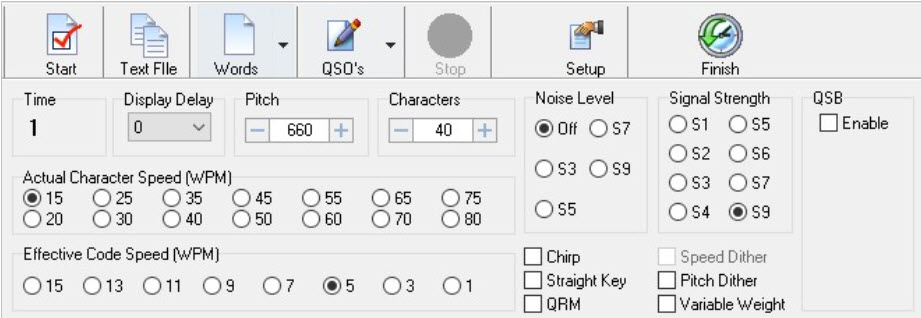
- Set the Pitch to 660
- Actual Character Speed to 15
- Effective Code Speed to 5
and make any needed changes to the ‘button’ type options, as shown above.
Afterwards, open the ‘Setup’ tool and choose the “Morse Character Setup” tab:
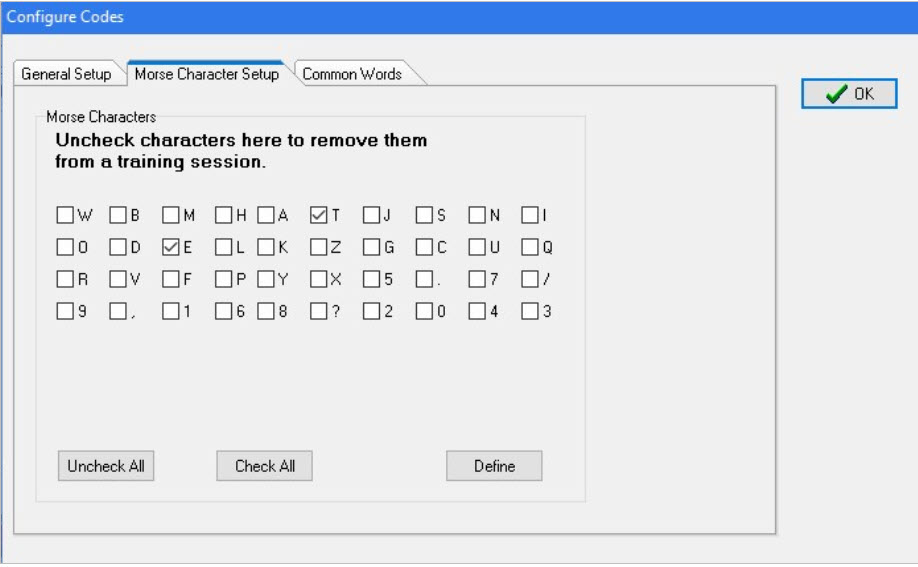
For the first lesson, choose only the letters ‘T’ and ‘E’ as shown above.
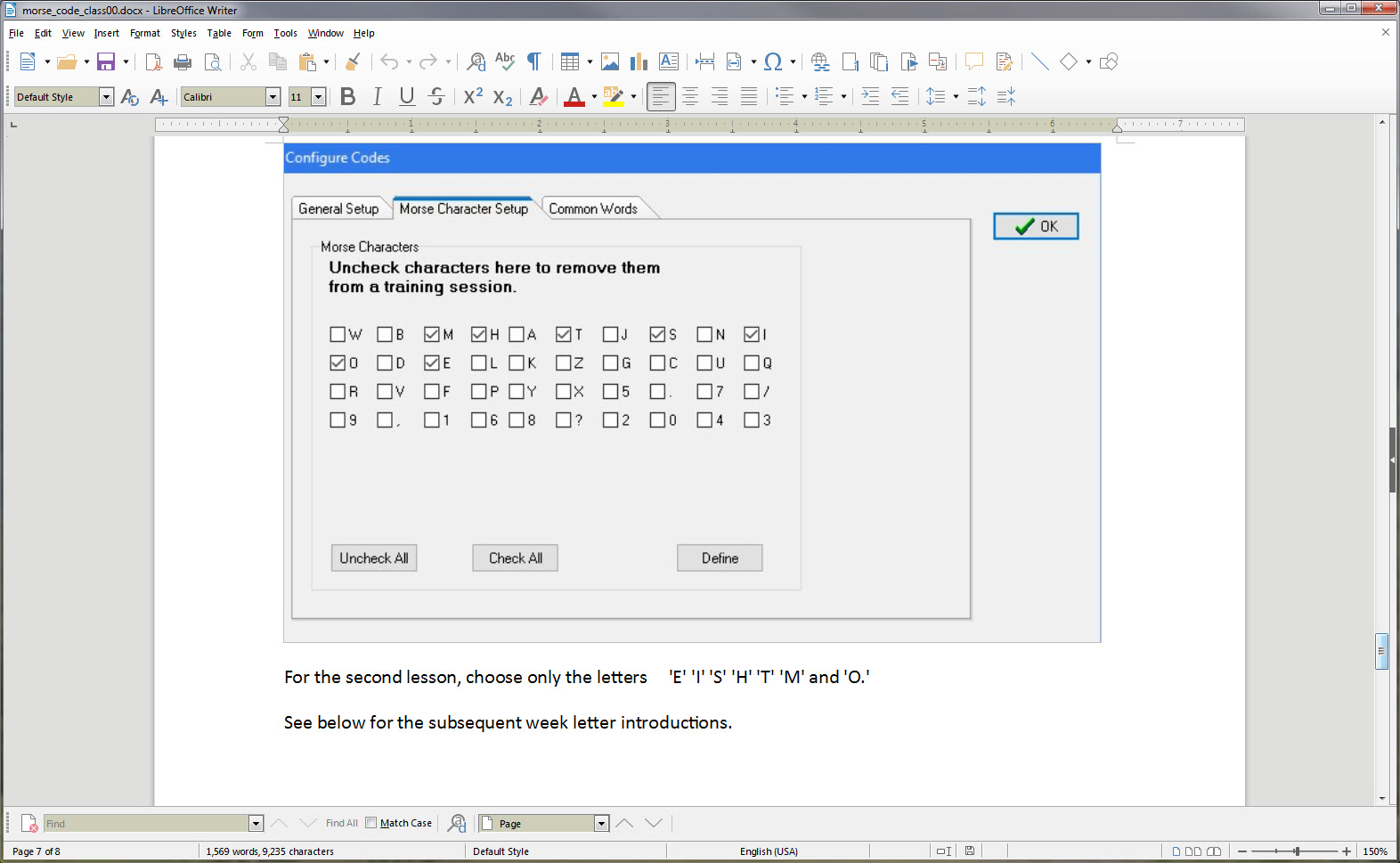
For the second lesson, choose only the letters ‘E’ ‘I’ ‘S’ ‘H’ ‘T’ ‘M’ and ‘O.’
See below for the subsequent week letter introductions.
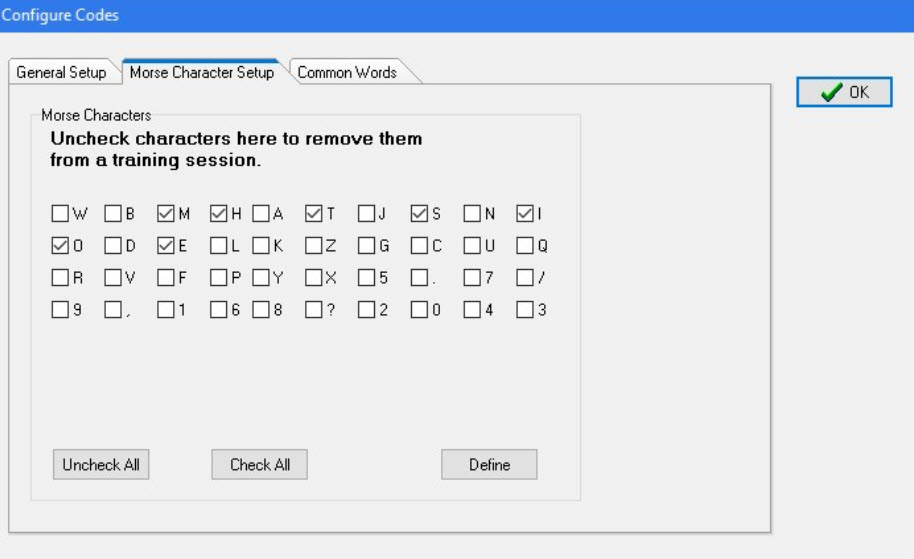
Here is a link to access the software:
http://www.g4fon.net/CW%20Trainer.htm
Lessons
Lesson 1 E T
Lesson 2 E I S H T M O
Lesson 3 A W J N D B
Lesson 4 U V G Z K R P X
Lesson 5 F C L Q Y
Lesson 6 1 2 3 4 5
Lesson 7 6 7 8 9 0
Lesson 8 . , ? /
Chatham receives $2.3 million grant for upgraded public safety radio system
Click here >>> Chatham News + Record for news article regarding Chatham EOC communications infrastructure upgrade
Morse Trainer Kit Build; What Happened, and What’s Next?
by Steve, KZ1X
At the OCRA meeting (14 Oct 2019) there was a group build session for assembling the K1EL Morse Tutor kit club project.
Of the 25 or so kits involved in the project, approximately 6 were completed prior to the meeting! Those are our eager builders, and we’re lucky to have folks like that here to learn from. So few areas have such a rich experienced resource these days.
Another approximately 13 kits were assembled at the event.
More than a few assemblers were first-time kit builders, so, they get a special shout-out, as do the several experienced mentors present whose help was invaluable.
Since the success rate for the kits was effectively 100%, we can move to discussion of an evaluation of the event, and some next steps.
To start … It did seem like the participants were fully engaged and either re-learning their assembly skills, or experiencing them for the first time. This is certainly a good thing!
It would be great to get some additional and candid feedback on what went well – and what could be improved for some possible future event like this. Please feel free to share here or via direct email.
Now that many people have these kits built and operating, what comes next?
Several things, in fact, come next.
Immediately, please try and familiarize yourself with the settings on the Morse Trainer units you built. Pay particular attention to the setting that lets you control the sound pitch (tone) of the sending. You will want/need to be able to change this.
Also, work on learning TO CLEARLY SEND the first four letters of the lessons: E, T, A and N. Don’t worry about speed, it’s the smoothness that’s important to get down pat.
If you need to hear what these letters should sound like, I will be ‘playing’ them on the air, just after the ARES nets on Saturday mornings.
Lastly, don’t forget to remove the power jumper on your Morse Tutor when not in use, since the battery will drain if left on. That would take a month or two, but, no sense in running the batteries down for no reason. Simply unplug the jumper from the two pins and then re-seat it on just one, so you won’t lose it.
After that …
-
- The intent has been all along to offer weekly Morse tutoring lessons over-the-air via the 442.150 repeater … and in fact these were originally intended to start around now. There have been several setbacks to this plan, delaying the rollout by multiple weeks. I ask forbearance, all successful ventures take more time than originally anticipated.
- Group study events … did anyone notice the special feature of this kit, which allows people to pair-off and send Morse to each other in small group settings? The kits have a common RCA type jack on them, and with a simple phono male-male cable (which the club has several of if you don’t) they can be connected directly together! The MOST productive way to learn Morse is to first master a handful of characters (that is the purpose of the over-the-air sessions), make up words using just those letters, then send the code to a partner for practice. Then, reverse the listener and sender. These study events can be as few as two people, or up to MANY, and should take about 20 minutes each. The only catch is that there needs to be someplace people can go and have a quiet place for the study session. We’re spread over a very wide geographic area so this becomes challenging to manage. In an ideal world, we’d all have a weekly lesson session, and nobody would miss one. More realistically, those sincerely interested in learning the code can work with a buddy, perhaps one closer by than further, and help each other out getting to learn all 26 letters, ten digits, and a few punctuation and prosign characters.
- Computer aided training … there is Morse tutorial available called G4FON (the call sign UK ham who originally came up with it) and it’s available for PC, Mac, tablets, phones, you name it.In the next week or two I will send more information about this software and how to set it up to complement the coming training sessions.
For now… here are some links, see if you can install this software in your favorite device, and please report all successes or any gotchas:
http://www.g4fon.net/CW%20Trainer.htm for Windows
https://apps.apple.com/us/app/morse-elmer/id414371107 Apple iOS
https://play.google.com/store/apps/details?id=net.iz2uuf.cwkoch&hl=en_US Android OS
73
Steve KZ1X
Fall 2019 OCRA Club Construction Project
by Steve KZ1X
A few months ago I conducted an email ‘straw poll’ to gauge the interest in a club construction project.
It has been quite some time since the last such project.
The target date proposed for this project is the October 14, 2019 OCRA meeting.
This year’s idea was to build a very simple, but great quality and low cost Morse tutor keyer kit, and to back it up with over-the-air Morse lessons at some later date.
Response
The interest level in the kit itself was rather high, approximately 21 persons, and then others responding in ways other than via email. Some persons responding are DFMA members, as the email went out on the joint mail reflector.
Perhaps half the responders expressed concern about their electronics assembly skills.
They either were interested but felt it might be too complicated, many have never done anything like this before, they lacked the tools, were worried about success, or how to troubleshoot, needed help, and so forth.
Morse classes
The interest level in the Morse lessons was also high, higher than I expected. Some people wanted to get more proficient at their existing Morse skills and others wanted to learn from scratch. Still others already have Morse skills but just wanted to build the little kit!
Addressing the Concerns
To address the kit building concerns, at least two and possibly several more assembly workstations will be set up at the OCRA club meeting site, which for this session could start 30 minutes earlier than normal. The extra time would allow for everyone who wanted to, to get a chance to assemble and test his or her keyer.
Plenty of experienced builders are in the club and plan to attend this meeting, so there will not be any shortage of assistance.
To make sure the vendor can get the kits out in time, do not wait until just days before the event to order yours!
Project FAQ
- Who makes this kit?
A small New Hampshire firm headed up by K1EL, a very well known ham whose call is almost synonymous with Morse keyer accessories.
- How do you get a kit?
Order it from the link below.
- How much does it cost?
The price currently is $22 plus shipping. The vendor is selling the kits quite near his raw parts cost, to assure it stays popular among newcomers to Morse. Another product sold by the same vendor, with similar functionality, costs almost 5 times this price.
- How long does it take to get the kit?
About 4 or 5 days, here in NC. It comes USPS.
- What else do you need to make the kit work?
Three AA size alkaline cells.
- What tools do I need?
It is best to have needle nose pliers, a small flush cutter, solder, and a temperature-controlled soldering station. These links are just high-quality suggestions, for those wishing to equip one’s own new workbench. There will be tools available at the club meeting.
- How long does it take to build?
Between 15 – 45 minutes, depending on skill level, equipment, pace, etc.
- Are there any surface-mount type parts in the kit?
No.
- What happens if it does not work?
That is not likely to happen, if you build yours at the club meeting there is a near zero chance to have this kit not work.
- Can I get my kit and build it myself before the meeting?
Yes, of course, and then you can help others!
- What do you get in the kit?
All the parts needed to make one complete keyer assembly, except for the AA cells.
The vendor also answers many of these questions, of course, including a complete description of what the keyer does.
Check out the kit web page at this URL:
https://www.hamcrafters2.com/K16tutor.html
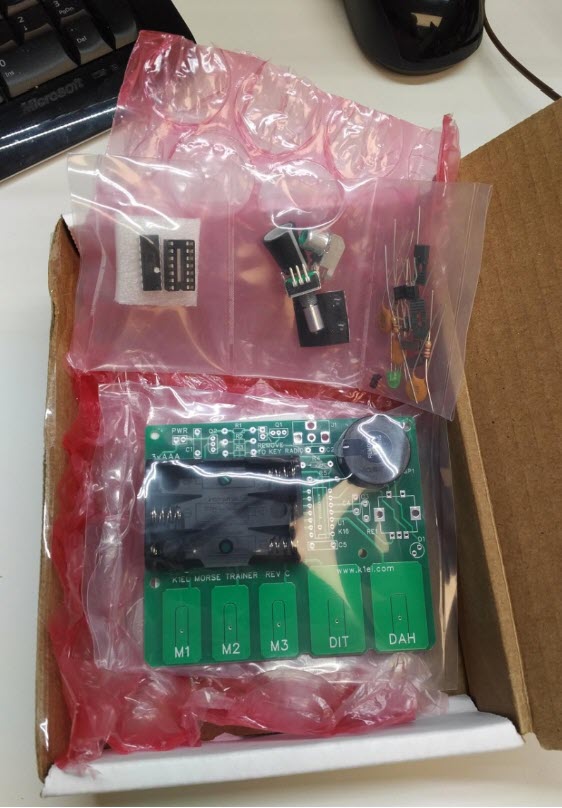
Here is a picture of the box as it comes from the vendor, located in New Hampshire.
The keyboard and mouse are shown for scale.
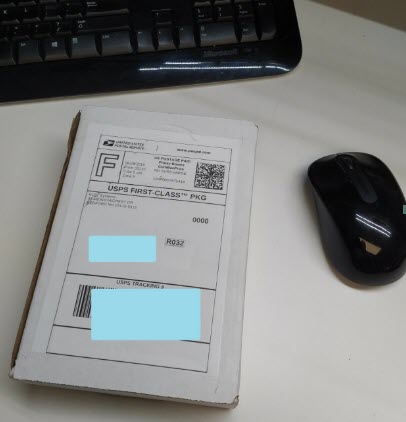
Inside the small white box are the circuit board and a bag with the parts needed to assemble the unit.
Here is what the unpopulated circuit board looks like, as you get it. (Yes, the AA cell holder is already mechanically attached, but NOT soldered.)
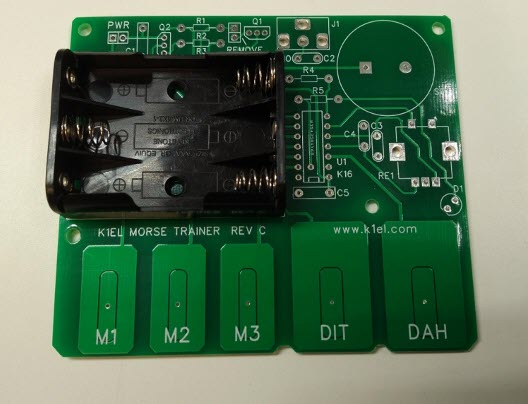
The bottom side of this circuit board, where the soldering takes place, looks like this:
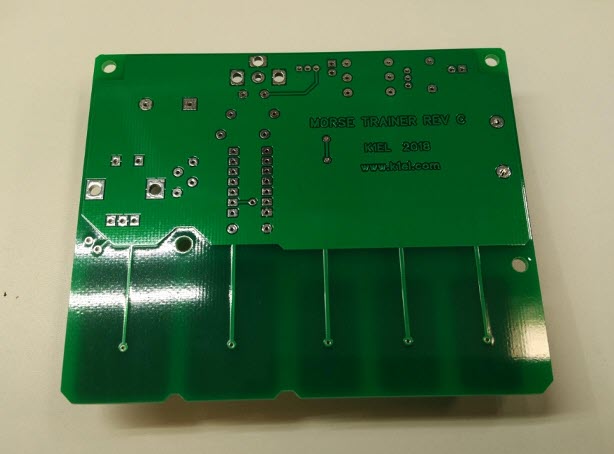
There are approximately 54 individual solder connections to make.
Here is the bag of parts:
and when assembled, it looks like this:
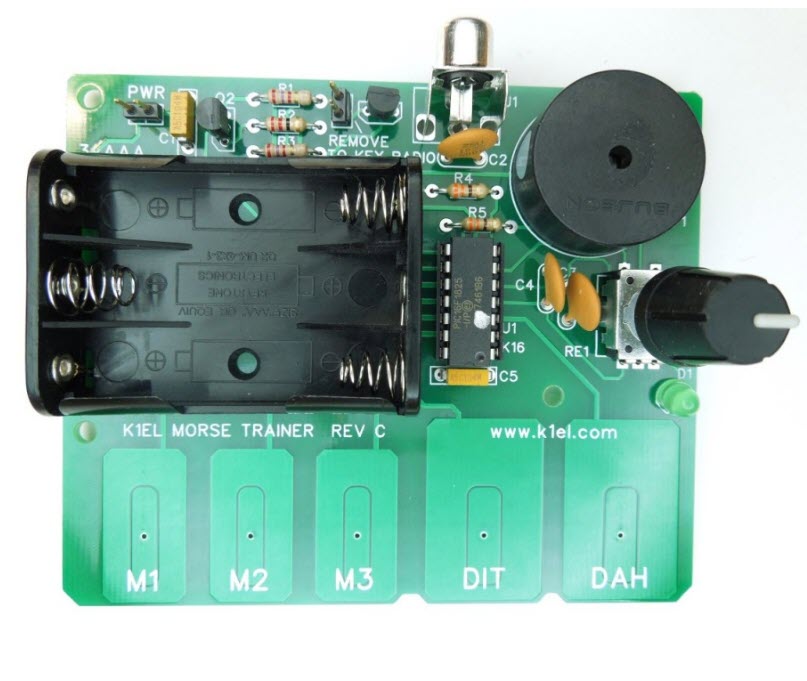
The assembly manual is available from the link above, and there is a button to click to place your order.
Please post any questions you may have to the OCRA-DFMA reflector.
Looking forward to the October 14, 2019 club meeting and the construction project.
Steve KZ1X